Decode Dodge Journey Warning Symbols to Prevent Issues
Every time you slide behind the wheel of a Dodge Journey, a small cluster of lights and icons sits ready to whisper—or sometimes shout—what the vehicle needs. Those warning symbols aren’t just decorative; they’re the car’s way of keeping you in the loop and, more importantly, keeping you safe. Let’s walk through the most common alerts, what they really mean, and how you can react without breaking a sweat.
Why the Dashboard Lights Matter
Think of the instrument panel as a personal mechanic that talks in pictures. A blinking amber light is usually a heads‑up that something needs attention soon, while a solid red one screams urgent action. Ignoring them can lead to costly repairs or, worse, a breakdown at the worst possible moment.
Key Warning Symbols and Their Meanings
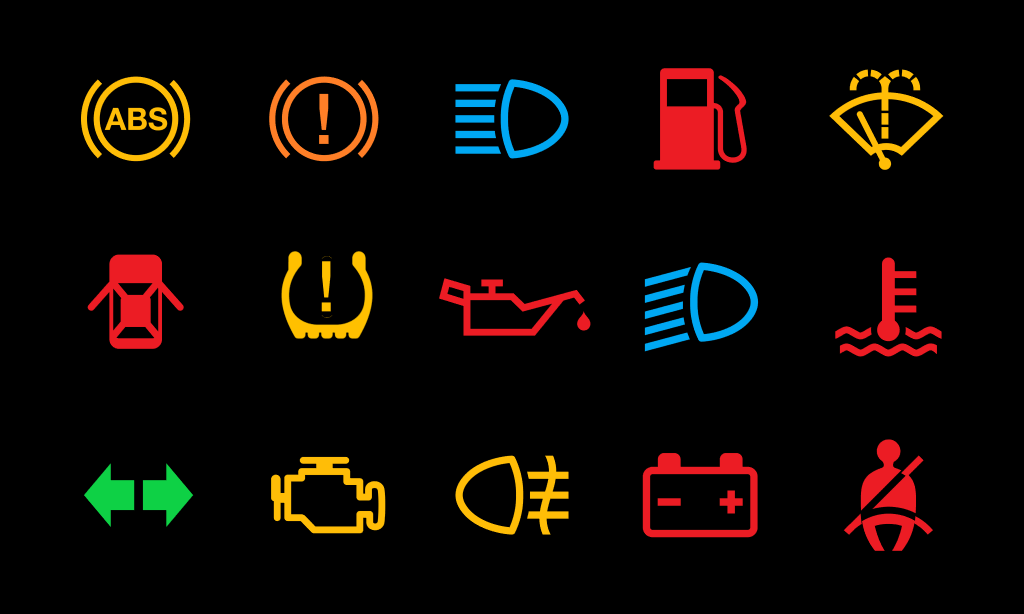
Engine Check Light (Malfunction Indicator Light)
What you see: A yellow engine outline.
This is the most dreaded yet often the most vague. It can range from a loose gas cap to a serious misfire. A quick first step is to check the cap; if it’s tight, schedule a diagnostic scan at a trusted shop.
Battery/Charging System Light
What you see: A battery icon, sometimes with a plus sign.
If the light glows while you’re cruising, it usually points to a slipping alternator or a failing battery. Turn the ignition off, restart, and if the light persists, call for roadside assistance—especially if the car starts to stall.
Oil Pressure Warning
What you see: An oil can or a drip.
Low oil pressure can quickly turn a healthy engine into a seized masterpiece. Pull over, check the dipstick, and add oil if the level is low. If you’re already low on oil, don’t try to drive it any further.
Coolant Temperature Light
What you see: A thermometer submerged in liquid.
When it lights up, the engine is overheating. Turn off the A/C, pull over, and let the engine cool before opening the radiator cap. Continuing to drive can cause warped heads or a blown gasket.
ABS Warning Light
What you see: The letters “ABS” inside a circle.
This indicates a problem with the anti‑lock braking system. The brakes will still work, but you’ll lose the extra stability during hard stops. A diagnostic test will pinpoint the sensor or module at fault.
Airbag Warning Light
What you see: A seated figure with a circle.
If this stays on, one or more airbags may not deploy in an accident. A quick visit to the dealer can reset the system; don’t gamble with a potentially disabled safety feature.
Tire Pressure Monitoring System (TPMS)
What you see: An exclamation mark inside a tire cross‑section.
Low pressure can affect fuel economy and handling. Inflate the tires to the recommended psi—usually found on the driver’s door jamb—and the light should disappear after a few miles.
Brake System Warning
What you see: An “BRAKE” rectangle or a circle with an exclamation.
Two common triggers: low brake fluid or worn pads. If you hear a squeal, it’s likely the pads; if the light stays solid red, check fluid levels and avoid steep descents until it’s addressed.
Quick Checklist When a Light Appears
- Stay Calm: Panic only makes the situation harder to assess.
- Identify the Color: Amber = caution, Red = immediate action.
- Note the Symbol: Match it to the list above or your owner’s manual.
- Pull Over Safely: If the light is red or the car feels off, find a safe spot.
- Inspect Basics: Caps, fluid levels, tire pressure—quick visual checks can solve many alerts.
- Decide on Next Steps: Can you drive to a nearby shop, or do you need a tow?
When to Call a Professional
Some warnings are straightforward fixes; others hide deeper issues. If you’re ever unsure, especially with red lights, treat it as a “call the pros” scenario. A qualified technician can pull a diagnostic code, saving you time and guesswork.
Maintenance Tips to Keep Alerts at Bay
Prevention beats reaction every single time. Here are a few habits that keep the dashboard from lighting up unnecessarily:
- Replace the air filter every 12 000 – 15 000 miles.
- Schedule oil changes and fluid top‑offs on time.
- Inspect battery terminals for corrosion annually.
- Rotate tires and check alignment during service intervals.
- Run a full system scan during major service visits.
Adopting these simple routines won’t eliminate every warning, but it reduces the odds of surprise alerts and extends the life of your Journey.
Bottom Line
The next time a symbol flickers on your Dodge Journey’s dash, you’ll know exactly what to look for and how to react. By treating each warning as a conversation starter rather than a threat, you keep your vehicle humming and your peace of mind intact.