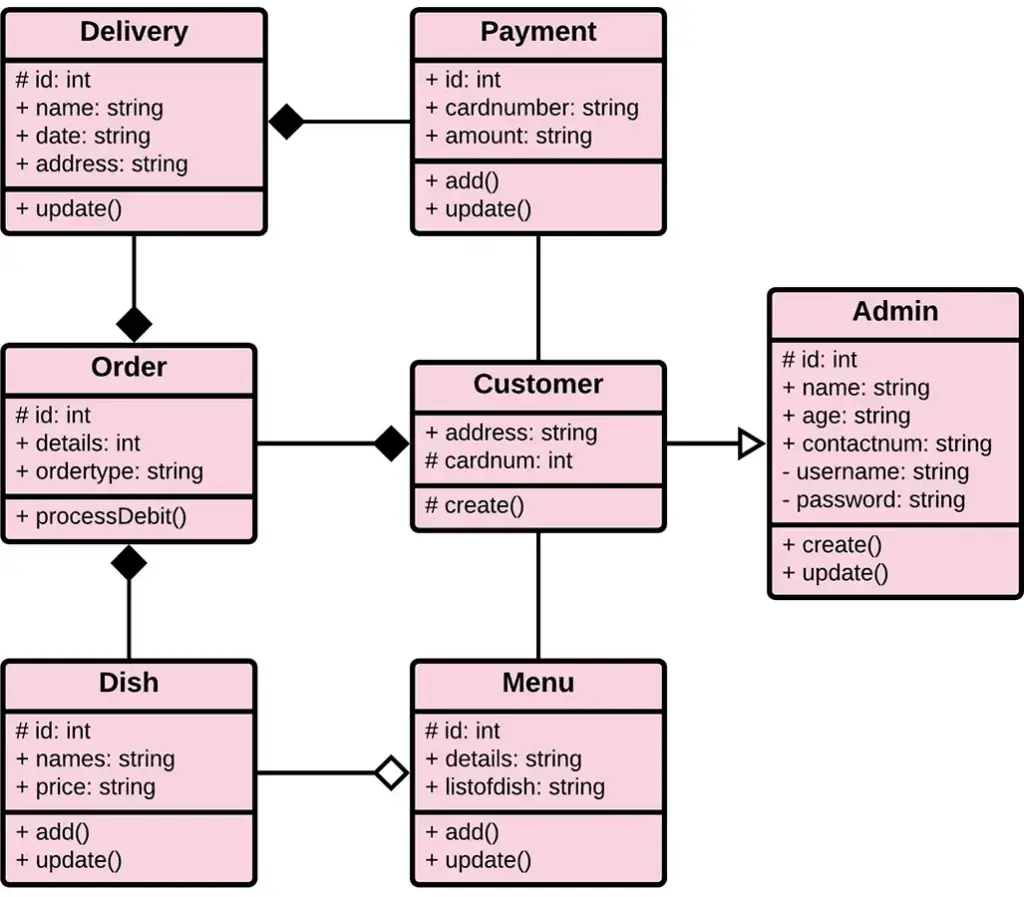
Designing a Robust Class Diagram For Item Delivery
Building a delivery system sounds simple on the surface: a customer places an order, a driver picks it up, and the item arrives. But under the hood, the complexity explodes. When you start coding this, you need a mental map. That’s where a class diagram for item delivery comes in. It’s not just a UML exercise; it’s the architectural skeleton that keeps your backend from collapsing under the weight of concurrent orders, inventory checks, and tracking updates.
If you’re designing an oMS (Order Management System) or a logistics platform, getting the relationships right is crucial. You don’t want a circular dependency between your `Order` and `Inventory` classes that causes a stack overflow during checkout. You don’t want a `Driver` class that knows too much about billing. This guide breaks down the essential components, their attributes, and how they interact to form a complete, functional model.
The Core Entities: Who and What Moves?
Every delivery system revolves around a few immutable truths. You have the thing being moved, the person who wants it, the person moving it, and the record of that transaction. In object-oriented terms, these are your primary classes.
The Order class is the central node. It doesn’t just hold a price; it aggregates state. An order isn’t static. It transitions from `Created` to `Packed`, then `OutForDelivery`, and finally `Delivered` or `Cancelled`. Your class diagram must reflect this lifecycle.
- Customer: The initiator. Holds shipping addresses and contact info.
- Item: The physical object. Needs SKU, weight, and dimensions.
- Warehouse: The source. It’s not just a location; it’s a state machine for inventory.
- Driver: The fulfillment agent. Linked to a vehicle and a current route.
Notice that `Item` and `Order` are distinct. A single order can contain multiple items. This is a composite relationship. If you conflate them, you’ll struggle to handle partial shipments—where one item from an order ships separately from another.
Defining Relationships and Multiplicity
This is where most junior developers stumble. Drawing boxes is easy. Drawing the lines with correct multiplicity is where the logic lives.
Order to Item: Composition vs. Aggregation
Does an `Order` own an `Item`? Not really. The `Item` exists in the database regardless of the order. However, an `OrderItem` entity usually sits in the middle. We don’t draw a direct line from `Order` to `Item`. Instead, we use an associative class: OrderItem.
Think about it. An order has many line items. Each line item references one product and has a quantity. This distinction matters. If you mark an item as "out of stock," you don’t delete the product class. You update its availability. The `OrderItem` records what was bought at that specific moment, locking in the price and variant. This separation allows you to analyze sales history even if the product is discontinued.
Driver to Delivery: The Temporal Link
A `Driver` class shouldn’t directly link to `Order`. It links to a Shipment or DeliveryAssignment. Why? Because a driver might pick up three orders from one warehouse header, or split one order across two drivers in edge cases.
The `Shipment` class acts as the bridge. It encapsulates logistics data: the truck’s capacity, the driver assigned, and the GPS coordinates. The `Order` aggregates into `Shipment`. This decoupling means you can change drivers without altering the order records. It also allows for "hands-off" tracking. The customer sees the order. The logistics team sees the shipment. Different views, shared data.
Key Attributes That Matter
Defining the structure is half the battle. The attributes define the reality. Here’s what you typically need to include in your class definitions to avoid refactoring later.
- Location Objects: Don’t just store a string address. Use a `Geolocation` class. Delivery relies on proximity algorithms. You need latitude, longitude, and a human-readable address. This allows the system to calculate distances for route optimization.
- State Enums: Use enums for status. Never use magic strings like "pending" or "shipped". Define `OrderStatus` and `DeliveryStatus` as enumerations. This enforces type safety. If your API accepts a status, it must be one of the valid states. This prevents bugs where a typo ("shiped") crashes the workflow.
- Timestamps: Every transitional event needs a timestamp. `createdAt`, `updatedAt`, `fulfilledAt`. These aren’t just for audits. They’re critical for calculating SLAs (Service Level Agreements). If a package stays in "Processing" for 48 hours, your system needs to flag it. The class diagram should arguably include an `AuditLog` or `EventHistory` class to track these transitions.
Handling Exceptions in Design
A realistic class diagram for item delivery accounts for things going wrong. What happens when a delivery fails? You need a `DeliveryException` or a `StateChange` record that triggers a new flow.
Consider the `Return` process. It’s not a separate system; it’s a reverse flow. A `ReturnRequest` links to the original `OrderItem`. It creates a new `Shipment` that goes in the opposite direction—from Customer to Warehouse. By modeling `Return` as a first-class citizen with its own state machine, you avoid hacking together a "reverse order" logic patch. The diagram should show a clear path where a `Shipment` can be marked `Completed` or `Failed`, with `Failed` triggering a reassignment or return workflow.
The Role of the Warehouse Class
Don’t ignore the warehouse. It’s not just a static address. In a robust diagram, `Warehouse` might inherit from `Location` but add methods like `allocateInventory()` or `reserveStock()`. When an order is placed, the system doesn’t just mark the order as "paid". It calls `warehouse.reserveStock()`. If that method returns false, the order state rolls back to `Cancelled`. This atomicity is vital. Your class diagram hints at these service methods, indicating where business logic resides.
Visualizing the Flow
When you pull this all together, your diagram tells a story. The `Customer` aggregates an `Order`. The `Order` aggregates `OrderItems`. Each `OrderItem` references an `Item`. The `Order` is allocated to a `Shipment`. The `Shipment` is linked to a `Driver` and traces a `Route`. Every step has a status.
This structure provides scalability. Adding a new feature, like "real-time GPS tracking," becomes a matter of adding a `LocationUpdate` class that relates to `Shipment`. Adding "delayed notifications" involves an `EventPublisher` service. The core classes remain stable. You aren’t rewriting the `Order` class every time you add a marketing feature. That is the power of a well-designed, comprehensive class diagram.
FAQ
Q: Should I include database tables in my class diagram?
A: Generally, no. Class diagrams model object-oriented logic (classes, methods, relationships). Entity-Relationship (ER) diagrams model database structures. While they often look similar, conflating them can lead to poor OO design. Keep your class diagram focused on behavior and state, not just storage.
Q: How do I handle split shipments in the diagram?
A: Use a one-to-many relationship from `Order` to `Shipment`. One order creates the demand. The logistics system breaks it down. The `Shipment` class acts as the container for the individual logistics events. This allows one `Order` to have multiple `Shipment` instances, each with its own status and driver.
Q: Is the "Item" class the same as "Product"?
A: Not necessarily. `Product` is the catalog entry (name, description, images). `Item` might be the inventory unit (SKU, warehouse location, quantity on hand). It is often cleaner to have `OrderItem` reference `Product` for metadata, but track stock via an `Inventory` class linked to `Item` variants. This separation prevents locking catalog data during high-volume sales transactions.
Q: Why use an associative class like OrderItem instead of a direct link?
A: Direct links lose context. If `Order` links directly to `Product`, you can’t store "quantity" or "purchase price" on that