Do You Need Spotify Premium to Use Its API?
When you start building a music‑related app, the first question that pops up is whether Spotify’s web API is locked behind a Premium subscription. The short answer is “not exactly,” but the reality is a bit more nuanced. Understanding which endpoints require a Premium account, how authentication works, and what you can realistically achieve with a free tier will save you time and headaches down the road.
What the Spotify API Actually Offers
Spotify provides a RESTful API that lets developers fetch track metadata, manage playlists, control playback, and even retrieve user‑specific data like saved albums. All of this is documented on the official Spotify for Developers portal, and the API is free to use—no monetary cost is attached. However, the service is split into two main access levels: public endpoints that anyone can call, and user‑controlled endpoints that need explicit permission from a logged‑in Spotify account.
Authentication: The Gatekeeper
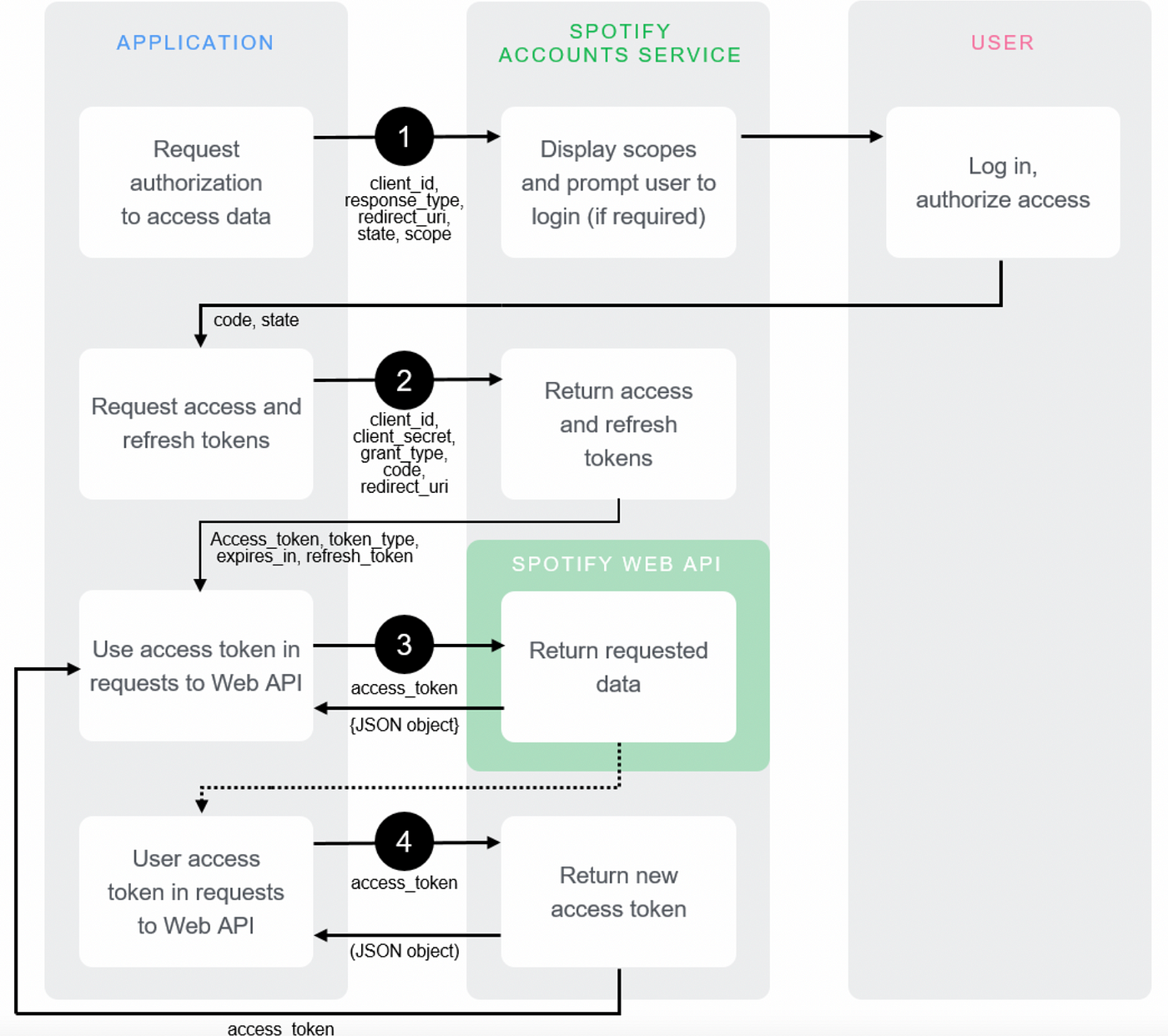
To call any user‑controlled endpoint you must first obtain an access token via OAuth 2.0. This flow requires a Spotify account, but not necessarily a Premium one. The token you receive encodes the scopes (permissions) you requested—things like playlist-modify-public or user-read-playback-state. The key point is that the API will honor the token’s scopes, regardless of the account’s subscription tier, unless the specific scope is explicitly limited to Premium users.
Which Scopes Are Premium‑Only?
user-modify-playback-state– lets your app start, pause, or skip tracks.user-read-currently-playing– reveals what the user is listening to in real time.user-read-recently-played– pulls a history of tracks the user has played.
All three of these are tied to the playback experience, and Spotify restricts them to Premium accounts because free users are subject to ad‑supported, shuffle‑only playback on most platforms.
What You Can Do Without Premium
If you only need to read public data—search for tracks, pull album artwork, or retrieve an artist’s top songs—you can do so with a token from a free account. Even playlist creation and editing are possible, provided the playlist itself is not a “collaborative” one that demands Premium for certain actions. In practice, many developers build recommendation engines or analytics dashboards that never touch the playback‑related scopes, and those apps work perfectly for anyone with a free Spotify account.
When Premium Becomes a Hard Requirement
Any feature that manipulates the current playback on a device—starting a song, changing volume, or syncing a queue—will return a 403 Forbidden error if the token belongs to a free user. This is because Spotify’s licensing agreements limit on‑demand streaming to paying subscribers. If your app’s core value proposition is “play this track instantly,” you’ll need to either enforce a Premium sign‑up flow or clearly state that the feature is unavailable for free users.
Strategies for Handling the Premium Barrier
1. Detect the user’s tier early. The GET https://api.spotify.com/v1/me endpoint returns a product field that tells you whether the account is “premium,” “free,” or “open‑beta.” Use this to tailor the UI—show a “Upgrade to Spotify Premium” button instead of a non‑functional play button.
2. Offer a fallback. If a user tries to trigger a Premium‑only endpoint, gracefully degrade to a preview mode. Spotify provides 30‑second preview URLs for many tracks, which work for free accounts and keep the experience fluid.
3. Separate concerns. Design your architecture so that playback‑related logic lives in a distinct module. That way, the rest of your app (search, recommendation, analytics) continues to function even when a user lacks Premium access.
Common Misconceptions About “Premium Required”
Many developers assume that the mere act of registering an app on the Spotify Dashboard forces a Premium subscription. In reality, the dashboard is free, and you can generate client IDs and secrets without paying. The only time you hit a paywall is when you try to use the user-modify-playback-state scope or any other Premium‑locked endpoint. So, the misconception stems from conflating “premium‑only features” with “premium‑only API access,” which are distinct.
Best Practices for a Smooth Integration
• Keep scope requests to the minimum needed. Over‑requesting can scare users away during the OAuth consent screen.
• Cache the product value after the first call; you don’t need to poll it on every request.
• Respect rate limits. Spotify caps calls at 10 requests per second per token, and hitting that ceiling can cause temporary bans, regardless of the user’s tier.
• Test both free and Premium accounts during development. The API behaves subtly differently, especially around playback endpoints, and you’ll spot edge cases early.
FAQ
Do I need a Premium account to retrieve a user’s playlists?
No. Reading a user’s playlists only requires the playlist-read-private scope, which works for both free and Premium accounts as long as the user grants permission.
Can I stream full tracks via the API with a free account?
Streaming full tracks is tied to playback control, which is a Premium‑only capability. Free accounts can only play 30‑second previews provided by the API.
Is there any cost associated with using the Spotify API?
The API itself is free. Costs only arise if you choose to host a backend or exceed rate limits, which may require a paid hosting solution—but not a Spotify subscription.
What happens if I call a Premium‑only endpoint with a free token?
Spotify returns a 403 Forbidden response, often with a message indicating that the user must be a Premium subscriber to use that feature.