How GitHub i18n Workflow Templates Accelerate Localization
When you adopt i18n workflow templates on GitHub, you give your localization team a clear, repeatable path from source strings to translated UI. No more ad‑hoc scripts or scattered pull requests—everything lives in the same repository, follows the same naming conventions, and can be inspected with a single glance. The result is faster turn‑around, fewer missed keys, and a smoother hand‑off between developers, translators, and reviewers.
Why a Structured i18n Workflow Matters
Internationalization (i18n) isn’t just about swapping English for French or Japanese; it’s about managing a living set of resources that evolve alongside code. Without a defined workflow, teams often stumble over:
- Inconsistent key naming that breaks UI rendering.
- Translation files that drift out of sync with new features.
- Manual copy‑pasting of strings, which invites human error.
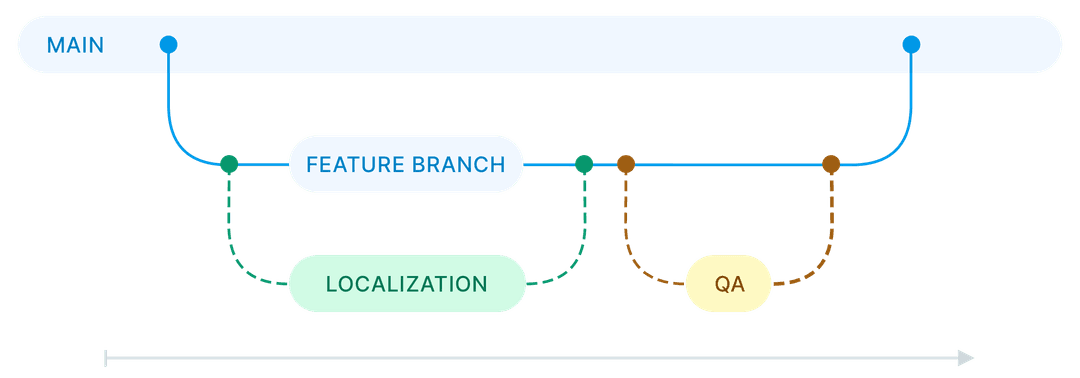
A templated approach codifies best practices, so every new branch automatically inherits the same checks, naming rules, and branching strategy. This predictability reduces cognitive load and lets developers focus on building features rather than hunting down missing locales.
GitHub’s Built‑In Template Engine
GitHub Actions and the repository‑wide .github folder provide a native way to store and reuse workflow templates. By placing a YAML file under .github/workflows, you can reference it from any other workflow with the uses keyword. This means a single source of truth for steps like extracting strings, uploading them to a translation management system (TMS), and pulling back translations.
The real magic lies in the ability to parametrize these templates. You can define inputs such as the target language, the path to your locale files, or the branch name that should trigger the sync. When a contributor opens a PR that touches src/**/i18n/**, the workflow automatically runs, flags missing translations, and even posts a comment with a direct link to the TMS dashboard.
Setting Up a Template for Your Project
Here’s a quick rundown of the steps you’ll typically follow:
- Create a generic template. Name it something like
i18n-sync.ymland store it in.github/workflows/templates. Include jobs for extract, upload, download, and validation. - Define inputs. Use the
inputsblock to let downstream workflows specify the locale directory (e.g.,locales/) and the target languages. - Reference the template. In each project‑specific workflow, add
uses: ./.github/workflows/templates/i18n-sync.yml@mainand pass the required inputs. - Secure secrets. Store API keys for your TMS in
Settings → Secretsand reference them as${{ secrets.TMS_API_KEY }}inside the template.
Once the template is in place, any new repository can adopt it with a single line in its own workflow file. That’s the kind of reuse that turns a one‑off script into a company‑wide standard.
Best Practices for Collaboration and Review
Even the best automation can falter if people aren’t on the same page. Consider these habits:
- Document the template. Keep a
README.mdalongside the YAML file that explains each input, expected directory layout, and how to troubleshoot common failures. - Use code owners. Add an
CODEOWNERSentry for thelocales/folder so that any change automatically requests review from the localization lead. - Fail fast. Configure the validation job to block the merge if any missing keys are detected. This prevents broken UI from reaching production.
When reviewers see a clear checklist in the PR comment—“Strings extracted, uploaded, and translations synced”—they can approve with confidence, knowing the automation has already done the heavy lifting.
Automating Pull Requests with CI
GitHub Actions can also open new pull requests for translated files. After the download step pulls updated JSON or YAML files from the TMS, a job can run git checkout -b translations/update‑$(date +%Y%m%d) and push the changes back to the repo. The workflow then uses the actions/create-pull-request action to open a PR titled “Update translations – date.” This creates a clean, reviewable diff that isolates translation updates from feature code.
Such automated PRs are especially handy for large teams that release weekly builds. Translators can merge the “translation update” PR on their own schedule, while developers continue to push feature branches without worrying about stale locale files.
Real‑World Benefits and Case Studies
Companies that have embraced GitHub i18n workflow templates report tangible gains:
- Reduced turnaround time. One SaaS provider cut the average localization cycle from ten days to four, simply by automating the extract‑upload‑download loop.
- Higher translation quality. Automated validation caught 87 % of missing placeholders before code hit QA, lowering bug‑fix effort.
- Scalable onboarding. New developers can spin up a local environment that already includes the correct locale directory structure, thanks to the template’s built‑in setup steps.
These outcomes aren’t magic; they stem from the consistency that templates enforce. When every repository follows the same pattern, tooling can be reused, metrics become comparable, and the whole organization moves faster.
FAQ
What is the difference between an i18n workflow template and a regular GitHub Action?
A regular Action performs a single task (e.g., linting). An i18n workflow template bundles multiple related actions—extraction, upload, download, validation—into a reusable pipeline that can be invoked with custom inputs across many projects.
Can I use a third‑party translation platform with these templates?
Yes. Most templates expose the API key as a secret, so you can swap out the upload/download commands to work with Lokalise, Crowdin, Phrase, or any service that offers a REST endpoint.
Do I need to write custom scripts for each language?
Not if you design the template to accept a list of target languages as an input. The same job can loop through “en, fr, de, ja” and process each locale file in turn.
How do I handle right‑to‑left languages like Arabic?
Include a validation step that checks for Unicode directionality markers and ensures UI components respect the dir attribute. The template can be extended with a small script that flags missing RTL flags.