How iCloud Storage Works on iPhone: Pricing and Plan Details
When you first sync an iPhone, iCloud appears as a convenient, almost invisible backup vault. Yet the moment your photo library grows or you start using iCloud Drive for documents, the question “how much does this actually cost?” pops up. Below, we break down the current iCloud storage tiers, who they’re best for, and a few practical tips to keep your data safe without blowing your budget.
Understanding iCloud Basics
iCloud isn’t a single product; it’s a suite of services—photos, files, device backups, email, and the occasional app sync. All of these share the same storage pool tied to your Apple ID. That means if you have 5 GB left for photos, you also have that same 5 GB for iCloud Drive files.
What Does the Free Tier Include?
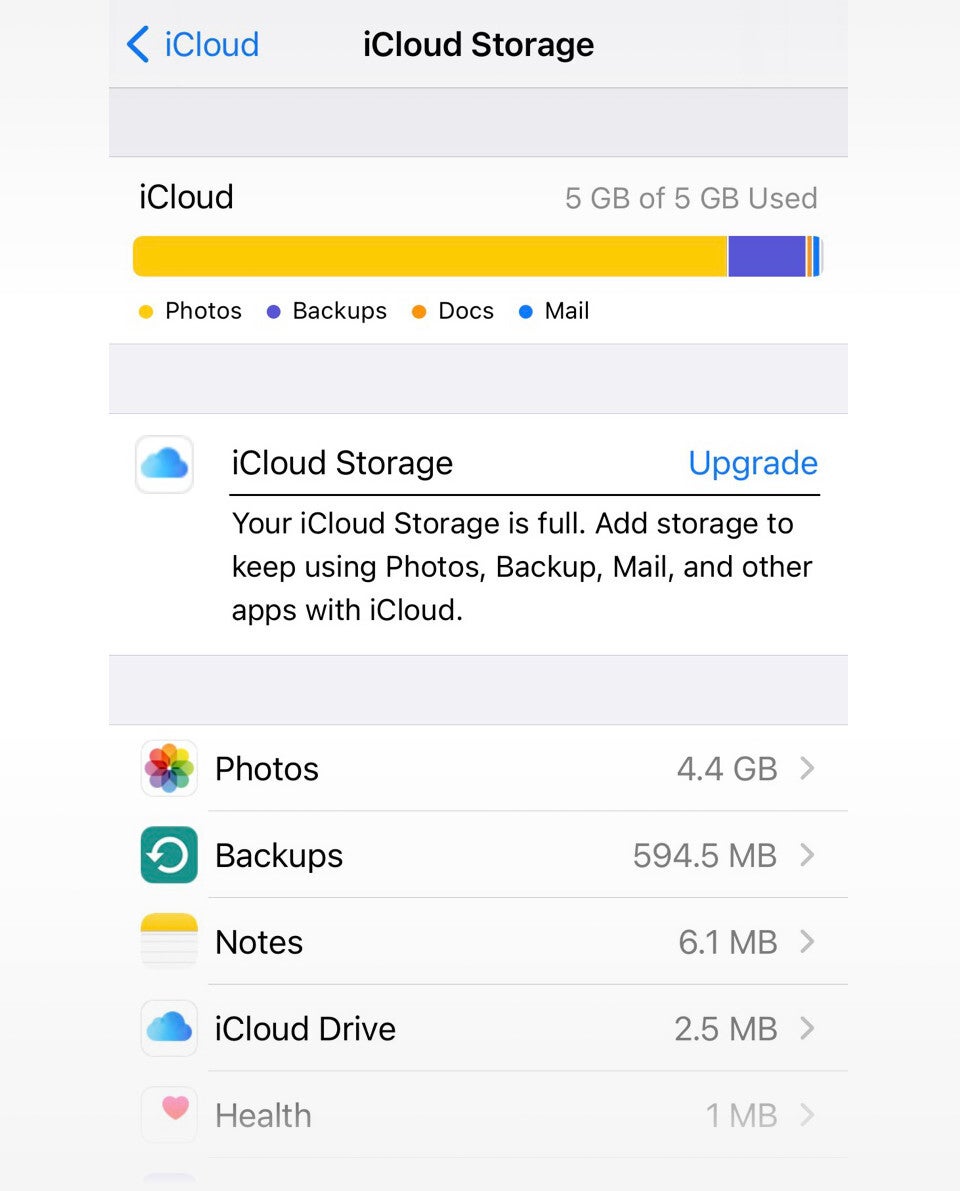
- 5 GB of total space—enough for a modest photo collection and a few app backups.
- Automatic backup of iPhone settings, app data, and device health metrics.
- Access to iCloud.com for basic document viewing and sharing.
For many casual users, the free allotment lasts a few months to a year before the tide of photos and apps starts to rise.
Current Pricing Structure (as of 2026)
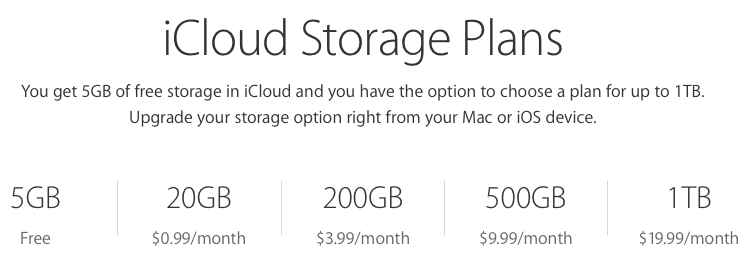
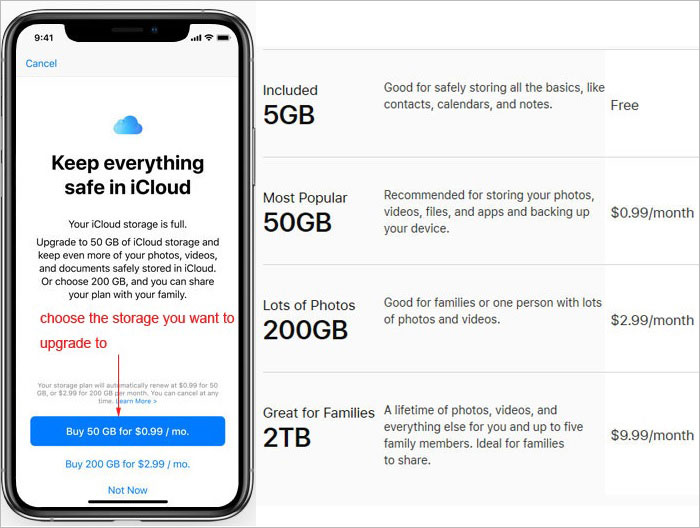
Apple’s pricing remains simple, with four paid options that stack neatly on top of the free 5 GB. All plans are billed monthly, though you can opt for an annual purchase through the Apple Store if you prefer a one‑time payment.
- 50 GB – $0.99/month: Ideal for a single iPhone user who takes photos regularly but doesn’t store large video libraries.
- 200 GB – $2.99/month: Good for couples or small families sharing a family plan; covers photos, documents, and a few backups.
- 2 TB – $9.99/month: Perfect for power users, photographers, or households with multiple devices needing ample backup room.
- 5 TB – $19.99/month: Targeted at professionals or small businesses that treat iCloud as a primary storage hub.
All paid tiers include family sharing, allowing up to six members to draw from the same pool—so a 200 GB plan can comfortably serve a family of four.
How to Choose the Right Plan
Instead of guessing, look at three practical metrics:
- Current usage: Open Settings → Apple ID → iCloud → Manage Storage. You’ll see a breakdown by app.
- Growth rate: If you add roughly 500 MB of photos per month, factor that into your future needs.
- Device count: More iPhones, iPads, or Macs typically mean more backups.
For example, a user with 30 GB used and adding 1 GB per month would likely find the 200 GB tier a comfortable cushion for the next two years.
Tips to Stretch Your iCloud Space
Before you jump straight to a larger plan, try a few low‑effort tricks:
- Enable “Optimize iPhone Storage” in Photos—keeps high‑resolution files in iCloud while storing smaller versions locally.
- Turn off iCloud backup for apps that don’t need it (e.g., games that store progress in the cloud already).
- Periodically delete duplicated or blurry photos; the “Recently Deleted” album holds items for 30 days.
- Move seldom‑used files to another cloud service (Google Drive, Dropbox) and keep only essential items in iCloud.
These steps can often reclaim several gigabytes, delaying an upgrade.
Family Sharing and Cost Splitting
Setting up Family Sharing is straightforward: one adult becomes the organizer, invites up to five members, and selects a shared storage plan. The cost is split automatically—each member’s Apple ID sees the same total space, but usage is individual.
Because the 200 GB plan is the most popular for families, the per‑person cost drops dramatically—roughly $0.75 per month for a family of four, compared to $2.99 if each bought it alone.
Hidden Fees and What to Watch Out For
Apple rarely sneaks extra fees into iCloud, but be aware of these nuances:
- If your payment method expires, Apple may pause the plan until you update it, and you could lose data after a grace period.
- Switching from a larger plan to a smaller one while still exceeding the new limit will trigger a warning and pause backups until you free space.
- International users might see slightly different pricing due to regional taxes.
Alternatives Worth Considering
While iCloud integrates seamlessly with iOS, some users find value in a hybrid approach. Services like Amazon Photos offer unlimited photo storage for Prime members, and Microsoft OneDrive provides generous storage for Windows users. Pairing these with a modest iCloud plan can give you the best of both worlds—Apple‑native backup plus specialized media storage.
Final Thoughts
Choosing the right iCloud plan isn’t about chasing the biggest tier; it’s about matching your data habits with a sensible price point. Start by monitoring your current usage, prune what you don’t need, and leverage family sharing if applicable. When you hit the limit, the jump from 50 GB to 200 GB or 2 TB feels less like a leap and more like a natural upgrade.