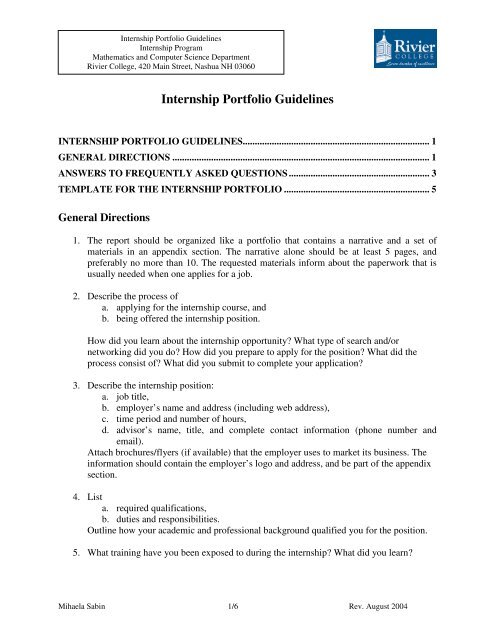
How to Build an Internship Portfolio PDF That Stands Out
Why a Portfolio Beats a Plain Resume
When you hand over a resume, hiring managers skim a page of bullet points. A well‑crafted internship portfolio PDF, on the other hand, lets you showcase actual work, design sensibility, and problem‑solving chops. It’s a visual résumé that tells a story rather than just listing duties. In competitive fields—marketing, design, engineering—candidates with a tangible portfolio often get the interview call.
Beyond bragging rights, a portfolio gives you a concrete way to reference specific projects during the interview. Instead of saying “I improved social media engagement,” you can point to a screenshot, a campaign brief, or an analytics chart that proves it. That level of evidence is hard to ignore.
Core Elements Every Internship Portfolio Should Contain
Think of your PDF as a curated gallery. Each piece should serve a purpose, and the overall flow should feel intentional.
- Cover Page – Your name, the internship role you’re targeting, and a clean visual cue (logo, personal brand mark, or a simple photo).
- Table of Contents – Optional for shorter PDFs, but helpful when you have multiple sections.
- About Me – A brief narrative (150‑200 words) that connects your background to the internship’s goals.
- Project Highlights – 3‑5 case studies that demonstrate relevant skills. Include context, your contribution, tools used, and measurable results.
- Skill Matrix – A concise chart or list of technical and soft skills, ranked by proficiency.
- References or Testimonials – One or two short quotes from professors, supervisors, or clients.
- Contact Information – Email, phone, LinkedIn, and a link to an online portfolio if you have one.
Designing the PDF: Layout, Fonts, and Visual Consistency
First impressions matter, even on a screen. Use a clean, two‑column layout for most sections; reserve full‑width pages for large visuals like mockups or data visualizations. Stick to one or two typefaces—one for headings, another for body copy—to keep the design cohesive.
Margins of 0.75‑1 inch give your content breathing room. For color, choose a palette that reflects your personal brand but remains professional: muted blues, greys, or a subtle accent color. Avoid neon hues or overly decorative fonts; they distract from the work you’re showcasing.
Internship Portfolio Sample PDF Examples: What They Look Like
Below are three common formats you’ll encounter. Feel free to mix and match elements that suit your discipline.
1. The Visual Designer’s Showcase
Start with a bold cover image—perhaps a brand identity you created. Follow with a grid of project thumbnails; each thumbnail links (via internal PDF navigation) to a detailed case study page. Include before‑and‑after visuals, style guides, and a brief “design brief” paragraph for context.
2. The Data‑Driven Analyst’s Report
Open with a concise executive summary. Use tables and charts to illustrate key metrics, then embed short narrative sections that explain methodology and impact. Highlight tools such as Python, Tableau, or Excel, and include a code snippet screenshot if relevant.
3. The Marketing Intern’s Campaign Deck
Structure the PDF like a mini‑campaign deck: problem statement, target audience, strategy, execution, and results. Show social media posts, email mockups, and a KPI dashboard. End with a reflection on what you learned and how it informs future work.
Step‑by‑Step: Turning Your Projects into PDF Pages
- Gather Assets – Collect images, PDFs, screenshots, and data files. Ensure each file is high resolution (300 dpi for print‑quality graphics).
- Write Clear Captions – Each visual should have a short, explanatory caption. Mention the goal, your role, and the outcome.
- Build a Template – Use PowerPoint, InDesign, or Google Slides to design a master slide that includes your header, footer, and branding elements.
- Populate the Template – Insert your content, maintaining consistent spacing and alignment.
- Export as PDF – Choose “high quality print” settings. Double‑check that hyperlinks (e.g., navigation from thumbnails to case studies) work.
- Proofread & Test – View the PDF on multiple devices. Look for broken links, image distortion, or font substitution.
Tips for Making Your PDF Easy to Scan
Recruiters often skim a portfolio in under two minutes. Help them find the meat quickly.
- Use bold headings and subheadings to break up sections.
- Keep paragraphs short—no more than three sentences.
- Include a quick‑look sidebar that lists key metrics (e.g., “+30% engagement in 6 weeks”).
- Leverage PDF bookmarks for navigation; they appear as a clickable outline in most readers.
- Limit the total page count to 8‑10 pages; more feels like a report, less feels like a flyer.
Common Pitfalls and How to Avoid Them
Overloading with Content – Including every class project makes the portfolio noisy. Curate only the most relevant pieces.
Inconsistent Branding – Switching colors, fonts, or layout styles mid‑PDF confuses the reader. Stick to a single visual language.
Poor File Size – PDFs over 5 MB may be rejected by application portals. Compress images without sacrificing readability.
Lack of Context – Simply showing a design mockup without explaining the brief leaves the viewer guessing. Always frame the problem and your solution.
Final Checklist Before You Hit Send
- Does the PDF open correctly on both Windows and macOS?
- Are all hyperlinks and bookmarks functional?
- Is every image sharp and properly aligned?
- Have you included a personalized cover page?
- Did you proofread for spelling, grammar, and consistency?
FAQ
Q: How many projects should I feature in my internship portfolio?
A: Aim for three to five strong examples that directly relate to the role you’re applying for. Quality beats quantity every time.
Q: Can I use an online portfolio link instead of a PDF?
A: Yes, but many recruiters still prefer a downloadable PDF for offline review. The safest approach is to attach a PDF and include a link to an online version for deeper exploration.
Q: Should I tailor my portfolio for each application?
A: Absolutely. Swap out projects that align best with each company’s industry or the specific internship description. A targeted portfolio feels more personal and relevant.
Q: What software is best for creating a PDF portfolio?
A: Adobe InDesign offers the most control, but PowerPoint, Google Slides, or Canva can produce professional‑looking PDFs with less of a learning curve.