How to Bypass the iPad Air 2 Activation Lock Safely
Staring at that stubborn “Activation Lock” screen on an iPad Air 2 can feel like hitting a brick wall. Whether you inherited the device, bought it second‑hand, or simply forgot the Apple ID details, the lock prevents you from getting any use out of the tablet. This guide walks you through legitimate steps you can take to regain access, explains why the lock exists, and highlights the tools that actually work without violating Apple’s terms.
Why the Activation Lock Exists
When you enable “Find My iPad” on an iOS device, Apple automatically couples the hardware to the Apple ID that set it up. The result is the Activation Lock—a security measure designed to deter theft. If someone tries to erase or reactivate the iPad without the correct credentials, the lock pops up and demands the original Apple ID and password.
Understanding this background helps you see why the lock isn’t just an inconvenience; it’s a protective layer for both owners and buyers.
First Steps Before You Try Anything Else
- Check ownership paperwork. A receipt or proof of purchase can be invaluable if you need to involve Apple Support.
- Ask the previous owner. If the iPad was gifted or sold, the former user can remove the lock remotely via iCloud.
- Gather the device’s serial number. You’ll need it for any official support request.
Official Ways to Remove the Lock
1. Use the Original Apple ID
If you still have access to the Apple ID that was linked to the iPad, simply signing in will lift the lock. Go to Settings > General > Reset > Erase All Content and Settings after logging in, and the tablet will restart as fresh.
2. Request Removal Through iCloud
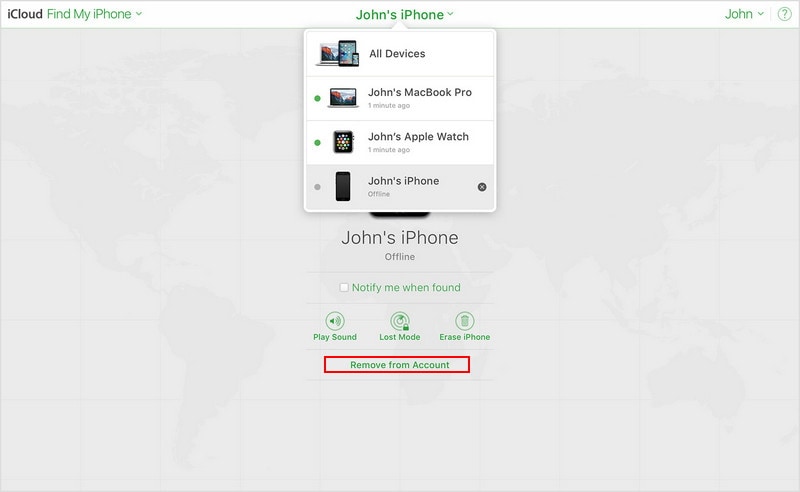
The previous owner can log into iCloud.com, select Find My iPhone, choose the iPad Air 2 from the device list, and click “Remove from Account.” This instantly disables the Activation Lock.
3. Contact Apple Support with Proof of Purchase
If you’re the rightful owner but lack the original Apple ID, Apple may still help. Provide the serial number, a sales receipt, and a photo ID. After verification, they can clear the lock for you.
When Official Methods Aren’t Possible
Sometimes you’re left with a device that has no clear ownership trail—perhaps a forgotten iPad found in a drawer. While the safest route remains the official channels, there are a few technical approaches that people often explore. Below we outline the most common, along with the risks involved.
Using Third‑Party Software
Several commercial utilities claim to “bypass” the Activation Lock by exploiting iOS vulnerabilities. These tools typically require you to connect the iPad to a computer, run a proprietary program, and follow on‑screen prompts.
- Pros: Can work on devices stuck at the activation screen, no Apple ID needed.
- Cons: Success rates vary, software may contain malware, and using them can void warranties.
- Legal note: Bypassing activation without permission may violate Apple’s terms of service.
Hardware‑Based Solutions
Advanced technicians sometimes employ a “jailbreak” or “DFU mode” exploit to load custom firmware. This method is technically demanding and often requires specialized hardware.
- Requires a Mac or PC with iTunes/Finder installed.
- Involves putting the iPad into Device Firmware Update (DFU) mode.
- Potentially bricks the device if something goes wrong.
Because of the complexity and risk, these options are generally reserved for professionals or enthusiasts who understand iOS internals.
Practical Checklist Before You Proceed
- Confirm you have a legitimate claim to the iPad.
- Backup any data you can access (sometimes you can still retrieve files via iTunes).
- Ensure the iPad’s battery is above 30% to avoid interruptions.
- Download any required software from reputable sources.
- Read user reviews and forums for the latest success stories.
Step‑by‑Step Guide for a Common Software Solution
Below is a generalized workflow that reflects the typical process for reputable third‑party tools. Adjust the steps based on the specific program you choose.
- Visit the developer’s website and download the Windows or macOS version.
- Install the software, then launch it with administrator rights.
- Connect the iPad Air 2 using a certified Lightning cable.
- The program should detect the device and display an “Activation Lock” warning.
- Select the “Bypass” or “Unlock” option and follow the on‑screen instructions. This might involve putting the iPad into recovery mode.
- When the process finishes, the iPad will restart and prompt you to set up a new Apple ID.
After the unlock, go to Settings > General > Reset > Erase All Content and Settings to wipe any residual data and start fresh.
What to Expect After Bypassing
Even if the lock is removed, some features may remain tied to the original Apple ID, such as iMessage activation or Apple Pay. Re‑registering the device with your own Apple ID should restore full functionality, but keep an eye on any lingering alerts.
Staying Safe in the Future
- Always sign out of iCloud before selling or gifting a device.
- Keep a record of the Apple ID and password used on each iOS device.
- Enable two‑factor authentication to avoid accidental lockouts.
- Consider using a device‑management solution for corporate iPads.
By following the official routes first and only turning to technical workarounds when absolutely necessary, you can unlock your iPad Air 2 without compromising security or warranty. The key is patience, proper documentation, and a clear understanding of what each step entails.
![How to Remove Activation Lock iPad [Solved]](https://imobie-resource.com/en/support/img/anyunlock-windows-bypass-icloud-activation-1.png)
![[Top 3] Forgot Apple ID and Password for iPad Activation Lock](https://www.tuneskit.com/images/resource/remove-ativation-lock-on-ipad.jpg)
![How to Remove Activation Lock iPad [Solved]](https://imobie-resource.com/en/support/img/anyunlock-windows-bypass-icloud-activation-5.png)
