How to Choose Between IPSec, SSL, TLS, and SSH for Secure Transfer
When you’re wiring up a new service or tightening up an existing network, the first question that pops up is: which security protocol should I trust? You’ve probably seen IPSec, SSL, TLS, and SSH tossed around in tech forums, but the differences aren’t always crystal clear. This guide walks you through the core ideas, real‑world trade‑offs, and a few practical tips so you can pick the right tool for the job without getting lost in jargon.
Quick Primer: What Each Protocol Actually Does
IPSec operates at the network layer, encrypting whole IP packets. Think of it as a blanket that covers every bit of traffic between two points, whether you’re moving HTTP, FTP, or VoIP.
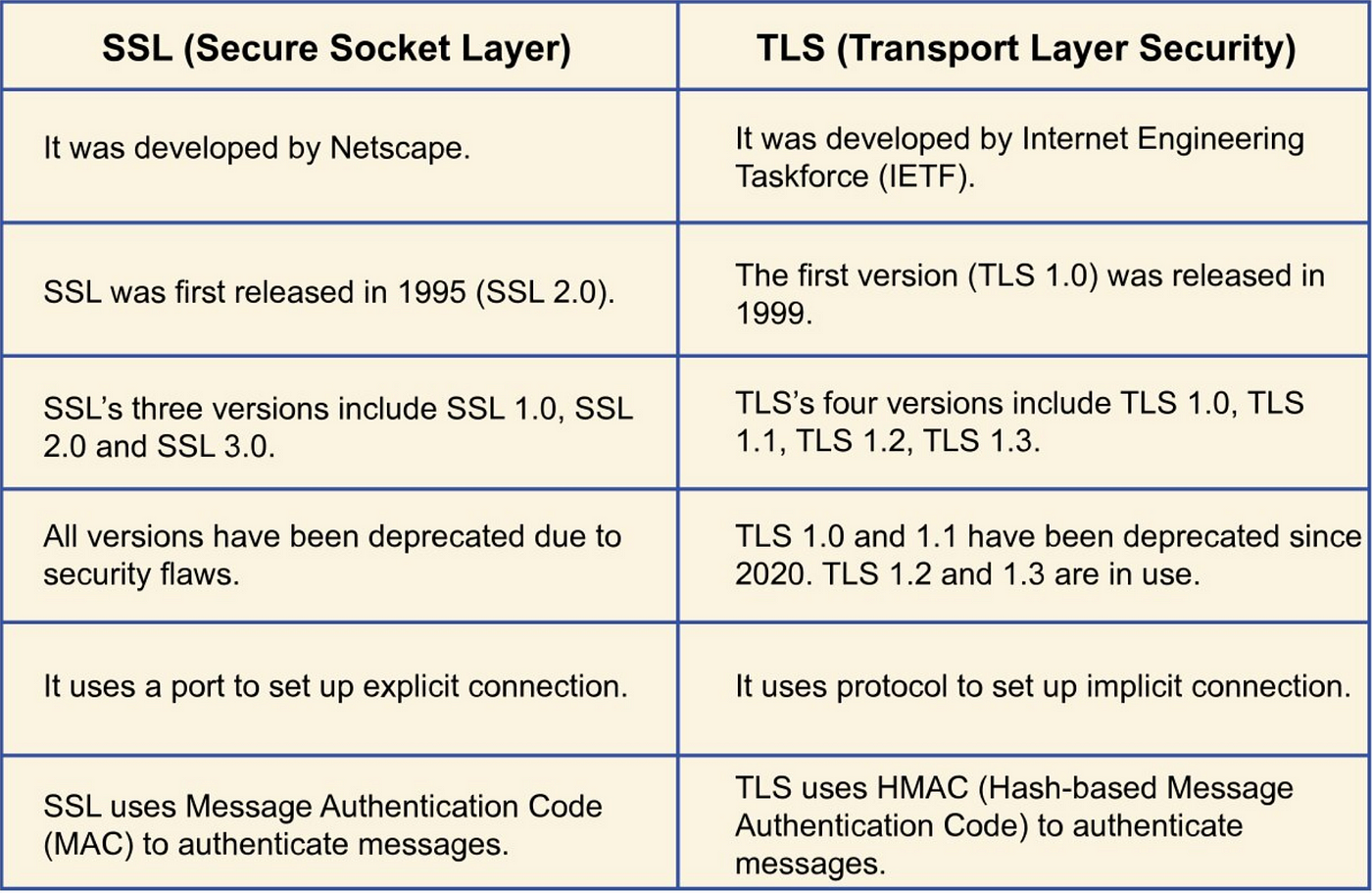
SSL (Secure Sockets Layer) and its successor TLS (Transport Layer Security) sit on top of the transport layer. They secure individual sessions—most famously the HTTPS connections you see in your browser.
SSH (Secure Shell) is a bit of a Swiss army knife for remote command‑line access, file transfers (SCP, SFTP), and even tunneling other protocols.
Key Comparison Factors
- Scope of protection: Network‑wide (IPSec) vs. application‑specific (SSL/TLS, SSH).
- Deployment complexity: IPSec often needs router or firewall configuration; SSL/TLS is usually just a library or web server setting; SSH is as simple as installing a daemon.
- Performance impact: Full‑packet encryption can be heavier; TLS’s handshake adds latency but is generally lightweight for web traffic.
- Compatibility: Legacy systems may only support SSL 3.0 (not recommended) or older TLS versions, whereas modern devices lean on TLS 1.3 and IPSec’s ESP mode.
When to Reach for IPSec
If you need to secure an entire subnet—say, connecting two office locations over a public WAN—IPSec shines. It’s also the go‑to for VPNs that encapsulate traffic regardless of the application.
Typical scenarios include:
- Site‑to‑site VPNs between corporate branches.
- Remote‑access VPNs for mobile workers who require all‑traffic protection.
- Protecting traffic for IoT devices that can’t run TLS natively.
Just remember that setting up IPSec can involve key exchange protocols like IKEv2, and you’ll need to manage security associations on both ends.
SSL vs. TLS: The Evolution You Should Know
SSL is essentially the grandfather of TLS. While you still see “SSL” in marketing (think “SSL certificate”), modern browsers and servers have all moved to TLS—ideally TLS 1.3 for its speed and reduced handshake round‑trips.
If you’re securing a website, API, or any client‑server app that speaks HTTP, TLS is the default. It offers:
- Strong forward secrecy with ECDHE ciphers.
- Broad library support (OpenSSL, LibreSSL, BoringSSL).
- Easy certificate management via PKI.
For internal services that don’t expose public endpoints, you might still opt for TLS with self‑signed certificates to keep the overhead low.
SSH: More Than Just a Terminal
SSH came onto the scene as a secure replacement for Telnet, but it’s grown into a versatile protocol. Its core strengths are:
- Secure remote command execution.
- Encrypted file transfer (SCP/SFTP).
- Port forwarding—both local and remote—great for tunneling legacy services through a secure channel.
Because SSH uses public‑key authentication, you can lock down access without juggling passwords. It’s perfect when you need an ad‑hoc secure tunnel or when you’re managing servers over the Internet.
Choosing SSH for Tunneling
Suppose you have a legacy database that only speaks plain‑text TCP. Instead of rewriting it, spin up an SSH tunnel from the client machine to a trusted bastion host. The traffic gets encrypted on the wire, and you avoid exposing the database directly.
Performance and Overhead: What to Expect
All four protocols add some CPU cost, but the magnitude varies:
- IPSec encrypts every packet, which can be noticeable on low‑power devices.
- TLS 1.3 cuts the handshake to a single round‑trip and uses modern AEAD ciphers, keeping latency low.
- SSH overhead is modest; the main hit comes from the initial key exchange.
If you’re dealing with high‑throughput environments (e.g., video streaming), consider hardware offload for IPSec or enable TLS session resumption to shave off handshake time.
Implementation Checklist
IPSec
- Decide between transport mode (protects payload only) vs. tunnel mode (protects entire IP packet).
- Pick a key exchange protocol—IKEv2 is recommended for its built‑in NAT traversal.
- Verify that both endpoints support the same encryption suites (AES‑GCM is common).
TLS/SSL
- Obtain a certificate from a trusted CA—or use a private PKI for internal services.
- Enable TLS 1.3 and disable outdated versions (SSL 3.0, TLS 1.0/1.1).
- Prefer strong cipher suites like TLS_AES_128_GCM_SHA256.
SSH
- Generate an SSH key pair; distribute the public key to the remote
authorized_keysfile. - Disable password authentication to lock down brute‑force attempts.
- Consider using
AllowTcpForwardingandPermitTunnelsettings to control tunneling.
Security Considerations You Can’t Ignore
Even the best protocol can be weakened by misconfiguration. Common pitfalls include:
- Using default or weak pre‑shared keys in IPSec.
- Leaving legacy TLS versions enabled, which opens the door to downgrade attacks.
- Allowing root login over SSH without key authentication.
Regularly audit your cipher suites, rotate keys, and keep software patched. A quick scan with tools like nmap or sslyze can reveal unwanted protocol versions.
Putting It All Together: A Decision Flow
Here’s a handy mental model to narrow down your choice:
- Do you need to protect an entire network segment? → IPSec.
- Is the traffic HTTP‑based or a web service? → TLS (prefer 1.3).
- Do you need secure remote shell or ad‑hoc tunnels? → SSH.
- Are you dealing with legacy applications that can’t be rewritten? → Consider wrapping them in an SSH tunnel or an IPSec tunnel.
The key is not to chase the “shiny” protocol but to match the tool to the problem.
Final Thoughts
Choosing between IPSec, SSL/TLS, and SSH isn’t about declaring a winner; it’s about understanding the layers they operate on and aligning that with your security goals. By weighing scope, performance, and manageability, you can set up a robust encryption strategy that fits both your architecture and your team’s expertise.