How to Master Valorant Team Voice Chat: A Complete Guide
Why Voice Chat Matters in Competitive Play
Valorant’s fast‑paced rounds leave little room for miscommunication. A well‑timed call can be the difference between a clutch win and a costly loss, especially when you’re juggling agents, spikes, and utility. That’s why most high‑rank teams treat voice chat as a core mechanic rather than an afterthought.
Getting Started: Setting Up Your Mic
Before you even think about strategies, make sure your hardware is ready.
- Choose a reliable headset. Wired options usually beat Bluetooth in latency.
- Adjust Windows sound settings. Set your microphone as the default input and enable “listen to this device” only for troubleshooting.
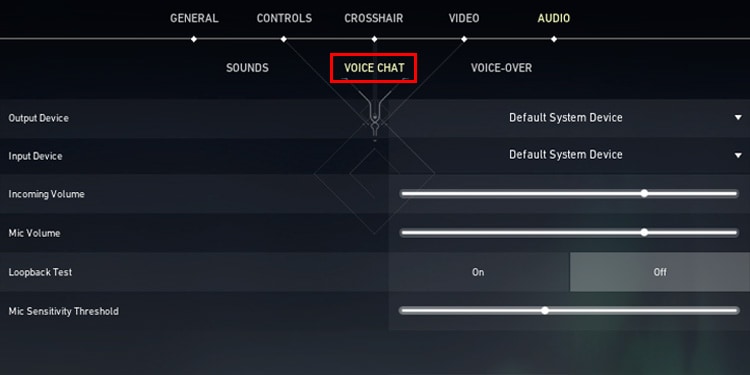
- Test in‑game. Valorant’s mic test (found under Settings → Audio) lets you confirm volume levels without leaving the lobby.
Common Pitfalls
Many players forget to disable “push‑to‑talk” when they actually want constant chatter. If you’re the call‑operator, consider keeping it on; otherwise, go for “always on” to avoid scrambling for the V key mid‑round.
Understanding the Voice Chat Channels
Valorant splits communication into three distinct layers:
- Team chat – the default channel for all squad members.
- Party chat – used before you join a match; it disappears once the game starts.
- Proximity chat – a newer feature that only transmits to players near your in‑game location (useful for sneaky plays).
Most competitive teams stick to team chat for everything, reserving proximity chat for specific map‑based tactics.
Effective Callouts: Brevity Meets Precision
Everyone knows “A site” is a callout, but the real magic lies in layering context.
- “Two enemies pushing A long, smoke on B.” – alerts both site pressure and utility usage.
- “Planting on B, need a defender at hook.” – gives the spike carrier a clear request.
- “Rotate now, they’ve cleared A.” – saves precious seconds.
Practice these patterns in casual games; they’ll become second nature in ranked matches.
Balancing Talk Time and Action
Over‑talking can drown out crucial audio cues like footsteps or gunfire. A good rule of thumb: speak only when you have new information or a specific request. If you’re holding a calm angle, stay silent and let your teammates hear the enemy’s footsteps.
Sample Communication Flow
Round start → “Ready, buying smokes.”
First contact → “One at B main, three at mid.”
Spike plant → “Planting B, need a lurker.”
Post‑plant → “Defuse timer 30, three alive.”
Customizing In‑Game Audio Settings
Valorant offers a handful of sliders that can dramatically improve voice clarity:
- Voice Volume – keep this high enough to cut through gunfire.
- Voice Chat Quality – set to “High” if your bandwidth allows.
- Audio Output Device – sometimes the default “Default Device” routes the chat through your speakers instead of your headset.
After tweaking, drop into a practice match and ask a friend to read a short script. If you catch every word without straining, you’re good to go.
Dealing With Toxicity and Noise
Even in a well‑coordinated team, a stray comment can derail focus. Valorant’s mute options let you silence individual players without leaving the match. Use the quick‑mute key (default Y) to toggle mute for the last speaker, then decide whether a permanent mute is warranted.
Pro Tip
If you notice a teammate repeatedly spamming “gg” mid‑round, mute them and send a quick text in the chat. Sometimes a gentle reminder restores order faster than a verbal scold.
Team Voice Chat Etiquette for Rankings
Ranked play carries an unspoken contract: respect, clarity, and efficiency. Here are the non‑negotiables:
- Keep profanity to a minimum – it can trigger automatic penalties.
- Acknowledge good plays (“nice frag!”) but avoid over‑praising.
- If you’re about to die, give a concise warning (“low health, fall back”).
Following these norms not only improves your win rate but also helps you climb the ladder without burning bridges.
Beyond the Game: Using Third‑Party Voice Apps
Many pro teams supplement Valorant’s built‑in chat with Discord or TeamSpeak for richer features like custom channels, screen sharing, and roster management. If you decide to go that route, remember to:
- Disable Valorant’s voice chat to avoid echo.
- Set a low microphone sensitivity on the third‑party app to prevent background noise.
- Test the setup before a live scrim.
Practice Makes Perfect
Finally, treat voice communication like any other skill. Schedule short “callout drills” with friends, focus on speed and accuracy, and review recordings if possible. Over time you’ll notice smoother rotations, fewer mis‑calls, and a steadier climb through the ranks.