How to Send Money with Remitly: A Simple Step‑by‑Step Guide
Why Remitly Might Be Your Go‑To Choice
When you need to move cash across borders, speed and cost are usually at the top of the list. Remitly has carved out a niche by offering two speed options—Express for those who can’t wait and Economy for the budget‑conscious. The platform also supports a surprisingly wide network of receiving countries, which makes it a solid contender alongside the likes of Western Union or TransferWise.
Getting Started: Setting Up Your Account
The sign‑up process is intentionally straightforward. You’ll need a valid email address, a phone number, and a form of government‑issued ID. After entering these basics, Remitly will ask you to verify your identity—usually through a quick selfie and a picture of your ID. This step is mandatory for regulatory reasons, but it typically takes just a few minutes.
- Email & password – Choose a password you can remember but isn’t easy to guess.
- Phone verification – A short code lands in your inbox; pop it in.
- Document upload – Passport, driver’s licence, or national ID will do.
Selecting the Right Transfer Speed
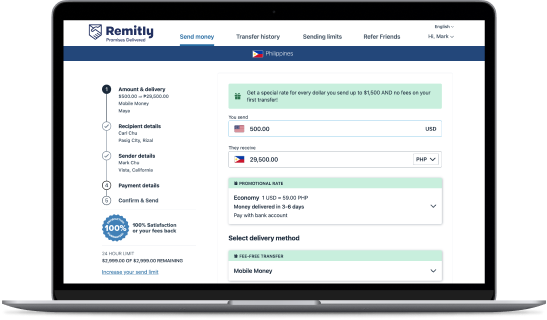
Once your account is live, the first decision you’ll face is whether to go Express or Economy. Express usually lands in the recipient’s bank or mobile wallet within minutes, but the fees can be noticeably higher. Economy, on the other hand, may take 3‑5 business days, yet the price difference can be substantial—sometimes up to 50 % cheaper.
If you’re sending for an emergency—say, covering a hospital bill—Express is worth the premium. For routine support, like monthly family allowances, Economy often makes more sense.
Choosing a Funding Source
Remitly lets you tap into several payment methods, each with its own cost profile:
- Bank debit (ACH) – Low fees, slower processing.
- Credit or debit card – Instant funding, higher markup.
- Apple Pay/Google Pay – Convenient on mobile, similar to card rates.
Keep an eye on the preview screen; the platform will show you the exact fee before you hit “Send.”
Entering Recipient Details
Accuracy here is crucial. Remitly typically asks for:
- Name as it appears on the recipient’s ID
- Bank account number or mobile wallet number
- Country and sometimes the city
A small typo can delay the transfer or, in worst‑case scenarios, send the money to the wrong person. Double‑check the spelling, especially for languages that use diacritics.
Understanding the Exchange Rate
Unlike some services that lock in a rate only after you confirm, Remitly shows the live rate on the entry screen and applies it once you authorize the payment. The displayed rate usually includes a modest margin over the mid‑market rate. If you’re sensitive to cost, you might wait for the “Rate Alert” feature, which notifies you when the rate hits a more favorable level.
Tracking Your Transfer
After you click “Send,” a tracking page appears. It breaks the journey into clear stages: “Processing,” “In Transit,” and “Delivered.” Most users receive a SMS or email once the funds land in the recipient’s account. The whole process is surprisingly transparent—far less mysterious than the old “bank‑to‑bank” transfers of the past.
Common Pitfalls and How to Avoid Them
Even with a user‑friendly platform, a few hiccups can crop up:
- Recipient’s bank limits – Some institutions cap incoming transfers; a quick call can clear this up.
- Currency restrictions – Not every country supports all currencies; double‑check that your chosen destination accepts the one you’re sending.
- Weekend delays – While Express runs 24/7, Economy may pause on weekends, extending the delivery window.
Fees At a Glance
Remitly’s pricing isn’t a flat rate; it varies by country, amount, and speed. As a rough guide:
- Express transfers: 2‑5 % of the amount, plus a small fixed fee.
- Economy transfers: 0.5‑2 % plus a lower fixed fee.
- Promotional codes: Occasionally, Remitly offers fee‑waiver coupons for first‑time users.
Always review the final cost before confirming; the platform is pretty good about being upfront.
Customer Support: When You Need a Hand
If something goes sideways, Remitly offers several support channels—live chat within the app, an email ticket system, and a phone line for urgent matters. Users generally report quick resolutions, especially when they have the transaction reference handy.
Bottom Line: Is Remitly Right for You?
In a nutshell, Remitly shines when you value speed plus clarity. The dual‑speed model gives you a choice, and the fee structure, while not the cheapest on the market, is competitive when you factor in the convenience of mobile‑first design. If you’re sending modest sums regularly to family abroad, setting up a Remitly account could become part of your financial routine.