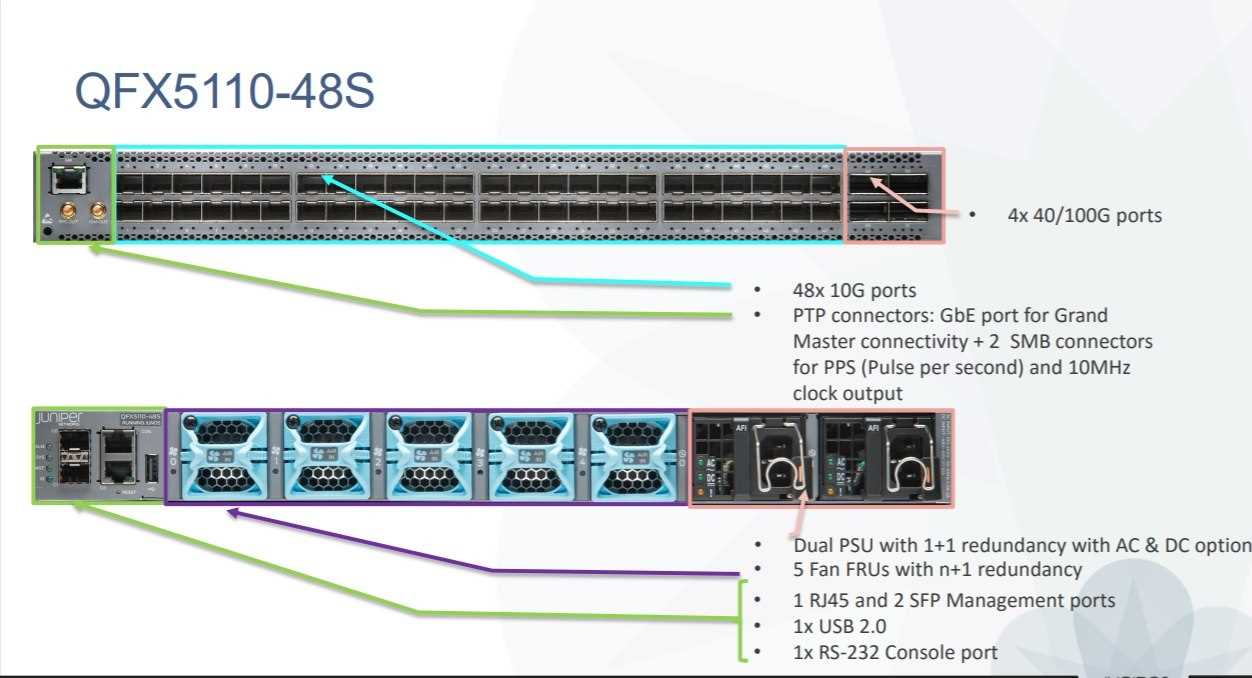
Juniper QFX5100‑48S6Q: Specs, Features, and What They Mean
If you’re shopping for a data‑center switch that can juggle dense 10 GbE and 40 GbE traffic without breaking a sweat, the QFX5100‑48S6Q often pops up in vendor tables. It’s not just another “high‑port” box; the design choices built into this model affect everything from power consumption to latency. Below you’ll find the key specifications, the standout features, and a quick guide on when this switch actually fits the job.
Core Hardware Overview
At first glance the QFX5100‑48S6Q looks like a typical 1‑U chassis, but its internals are worth a second look.
- Ports: 48 × 10 GbE SFP+ plus 6 × 40 GbE QSFP+ uplinks.
- Switching Capacity: 1.44 Tbps non‑blocking fabric.
- Forwarding Rate: Up to 1.07 Bpps (billion packets per second).
- Dimensions & Weight: 1.75 in (44 mm) tall, 17.5 in (445 mm) wide, 13.75 in (350 mm) deep; roughly 6 lb (2.7 kg).
The combination of dense SFP+ ports and a few 40 GbE “spine” links makes it a natural fit for leaf‑spine topologies, especially in mid‑size campuses where you want to keep the rack footprint low.
Software and Licensing
Juniper bundles the QFX5100‑48S6Q with the Junos OS, but the feature set can expand depending on your licensing tier.
- Base Junos – L2/L3 VLANs, static routing, basic ACLs.
- Advanced Routing – OSPF, BGP, and EVPN‑VXLAN for fabric extensions.
- Automation – Support for Junos PyEZ, Ansible modules, and gNMI.
Because Junos is a single OS across the whole Juniper portfolio, moving from a QFX5100 to a higher‑end QFX10K line is smoother than swapping vendors.
Why Licensing Matters
If you only need basic L2 connectivity, the free tier might be enough, but most data‑center deployments eventually hit a point where you need EVPN or overlay networking. That’s when the “Advanced Routing” bundle pays off – without it, you’ll be stuck configuring cumbersome VLANs instead of a clean VXLAN fabric.
Power and Cooling
Energy efficiency is often an after‑thought, but in a 48‑port switch it adds up.
- Typical power draw: 115 W (no PoE).
- Redundant 110 V AC power supplies, hot‑swappable.
- Front‑to‑rear airflow, compatible with standard rack cooling.
For a 1‑U device, the low wattage eases heat‑density concerns and can shave a few dollars off the overall data‑center power budget.
Key Features Worth Noting
- Virtual Chassis Fabric (VCF) – Up to 10 switches can be managed as a single logical device, simplifying cabling and reducing management overhead.
- Layer‑2/Layer‑3 Unified Forwarding – Seamlessly switch between L2 and L3 without re‑provisioning the hardware.
- Zero‑Touch Provisioning (ZTP) – New units can pull a config from a controller as soon as they boot, speeding up large roll‑outs.
- Telemetry – Stream real‑time stats via gRPC or sFlow for proactive monitoring.
When to Choose the QFX5100‑48S6Q
It’s easy to get lost in the spec sheet; the real question is whether those specs solve a problem you actually have.
- Leaf role in a leaf‑spine architecture – The 6 × 40 GbE ports give ample uplink headroom.
- High‑density 10 GbE access layer – Perfect for server farms that still rely on 10 GbE NICs.
- Budget‑conscious environments – Lower power draw and modest price point compared with 100 GbE‑only options.
- Future‑proofing with EVPN/VXLAN – If you plan to evolve toward an overlay network, the licensing path is clear.
Scenarios Where It Might Not Fit
If your spine needs 100 GbE or you anticipate needing more than six uplinks, a higher‑capacity QFX10K or a fully modular chassis could be a better investment. Likewise, if PoE is a requirement for powering edge devices, you’ll need a different model.
Real‑World Performance Tips
Benchmarks vary, but a few practical pointers can help you squeeze the most out of the switch.
- Group the 40 GbE ports into a single LAG for redundancy; this also balances traffic across the fabric.
- Enable adaptive QoS to prioritize latency‑sensitive workloads like storage traffic.
- Leverage the built‑in telemetry to feed a monitoring system; catching micro‑bursts early can prevent congestion.
In lab tests, a QFX5100‑48S6Q handling mixed 10 GbE and 40 GbE flows sustained near‑line rate without noticeable jitter, which is reassuring for latency‑critical applications.
Bottom Line Takeaway
The QFX5100‑48S6Q isn’t a flashy flagship, but it delivers a solid mix of port density, performance, and Junos‑centric features that make it a pragmatic choice for many midsize data‑centers. Its strengths lie in leaf deployments, cost‑effective power usage, and a clear upgrade path if you later need to expand into EVPN or higher‑speed uplinks. As always, match the spec sheet to your actual traffic patterns and growth plans – the hardware will be there when you need it, but choosing the right tool for the job saves time and money down the road.