Mastering ClickHouse DB Docker Setup, Optimization, and Best Practices
ClickHouse is a powerful, open-source column-store database management system designed for big data analytics and real-time queries. Setting up ClickHouse with Docker can simplify the process of getting started, but optimization and best practices are crucial for maximizing performance. In this article, we'll delve into the world of ClickHouse DB Docker setup, explore optimization techniques, and discuss best practices for leveraging this powerful tool.
To begin with, let's consider why using Docker for ClickHouse DB setup is a good idea. Docker provides a lightweight and portable way to deploy applications, ensuring consistency across different environments. This is particularly useful for ClickHouse, as it allows developers to easily test and deploy their database without worrying about the underlying infrastructure.
Setting Up ClickHouse with Docker
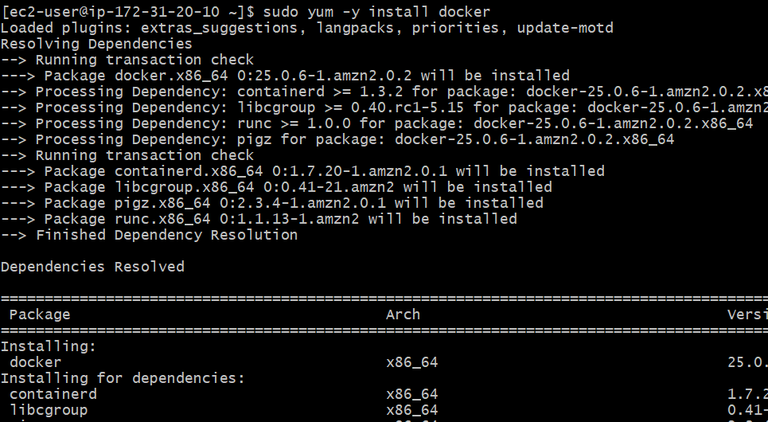
The process of setting up ClickHouse with Docker is relatively straightforward. First, you'll need to pull the official ClickHouse Docker image from Docker Hub. Then, you can run the image using the docker run command, specifying the necessary parameters such as the port and data directory. For example:
- docker pull yandex/clickhouse-server
- docker run -d --name clickhouse-server -p 9000:9000 -v /path/to/data:/var/lib/clickhouse yandex/clickhouse-server
Once the container is running, you can connect to ClickHouse using the clickhouse-client tool or any other compatible client.
Optimizing ClickHouse Performance
Optimizing ClickHouse performance involves a combination of configuration tweaks, query optimization, and hardware adjustments. One of the most important configuration parameters is the mark_cache_size, which determines the size of the cache used for storing metadata. Increasing this value can significantly improve query performance, but it also increases memory usage.
Another crucial aspect of optimization is query tuning. ClickHouse provides a range of features for optimizing queries, including support for distributed queries, query caching, and indexing. By leveraging these features, you can reduce the load on your database and improve overall performance.
Best Practices for ClickHouse DB Docker Setup
When setting up ClickHouse with Docker, there are several best practices to keep in mind. First, make sure to use a persistent storage volume for your data to avoid losing it when the container is restarted. You should also configure the ulimit settings to ensure that the container has sufficient resources to run efficiently.
In addition, it's essential to monitor your ClickHouse instance regularly to identify potential performance bottlenecks. You can use tools like ClickHouse's built-in monitoring system or third-party tools like Prometheus and Grafana to monitor key metrics such as query latency, memory usage, and disk usage.
Finally, security is a critical aspect of any database setup. Make sure to configure authentication and authorization properly, using features like SSL/TLS encryption and role-based access control to protect your data.
In conclusion, setting up ClickHouse with Docker can be a great way to get started with this powerful database management system. By following best practices, optimizing performance, and leveraging the features of ClickHouse, you can unlock the full potential of your database and achieve outstanding results in big data analytics and real-time queries.