Mastering the Java Break Statement: Loops, Switches & More
If you have spent any time writing Java code, you have undoubtedly encountered the break statement. It is one of those fundamental language features that seems simple at first glance but carries significant weight in how your program flow behaves. Essentially, break is an abrupt exit mechanism. It tells the JVM, "Stop doing what you are currently doing inside this specific block, and move on to the next part of the program."
While its primary job is to terminate loops and switch statements, understanding exactly how it works—and where it doesn't work—is crucial for writing clean, efficient, and bug-free code. Let’s dig into how this control flow statement operates, why it matters, and the common pitfalls developers often step into.
The Core Purpose of Break
At its heart, the break keyword is a control flow tool. In structured programming, we usually rely on conditionals to determine whether a loop should continue. For example, a while loop checks its condition at the start of every iteration. But what if the condition to stop isn't checked at the beginning, or what if the exit condition is complex and buried deep inside a large block of logic?
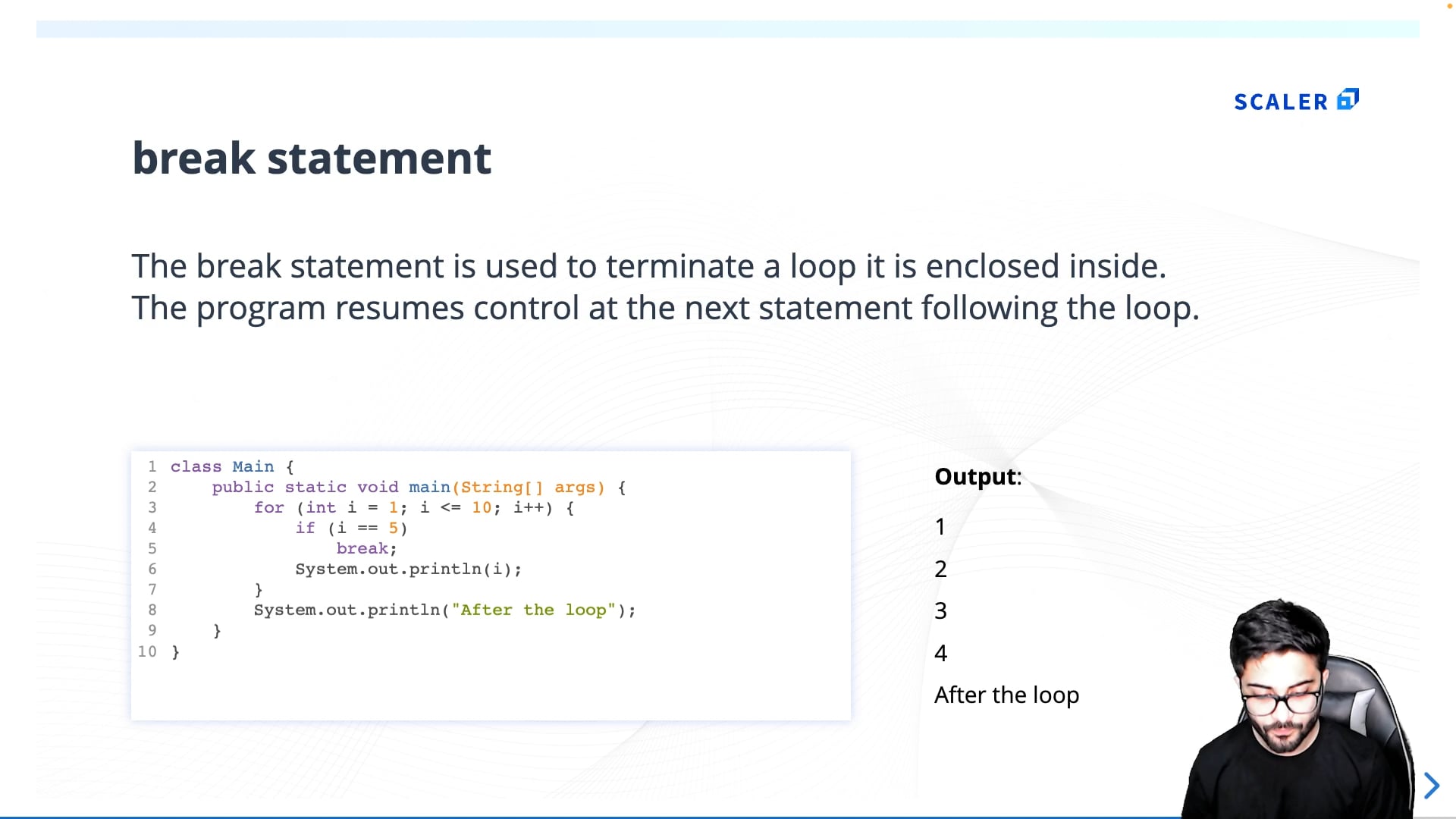
This is where break shines. It allows for immediate termination of the innermost enclosing loop or switch statement. It bypasses any remaining code in the current iteration and exits the block entirely. The execution then continues with the first statement following the terminated block.
It is important to note that break only affects the innermost loop or switch it is contained within. If you have nested loops, a break inside the inner loop will not exit the outer loop. This limitation often leads to the need for flags or labeled breaks, which we will touch on later.
Breaking Out of Loops
The most common use case for break is terminating a loop prematurely. Imagine you are searching through an array for a specific value. Once you find that value, there is no point in continuing to iterate through the rest of the elements. Continuing would waste CPU cycles and potentially lead to errors if you are not careful.
Consider a simple for loop iterating from 0 to 100. If you want to stop as soon as the counter reaches 50, you would place a break statement inside an if block that checks for that condition. When the condition is met, the loop terminates immediately. The program does not complete the remaining iterations; it jumps straight to the code after the loop.
This behavior applies equally to while and do-while loops. However, with do-while loops, there is a slight nuance. Since a do-while loop guarantees at least one execution of the body, the break statement evaluates conditions within that body to decide if the loop should exit early. Without it, the loop would continue until its boolean condition evaluates to false, which might not be efficient for certain search or validation tasks.
The Role of Break in Switch Statements
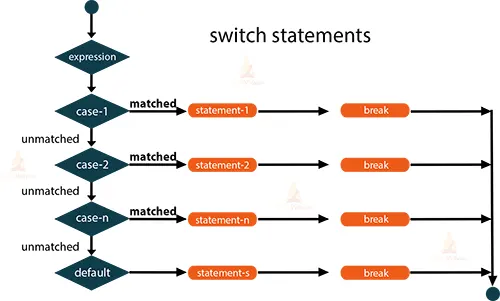
Before Java 12 introduced enhanced switch expressions, the break statement was absolutely critical in switch statements. In the traditional switch block, if you omit a break statement at the end of a case, the execution "falls through" to the next case. This fall-through behavior can be useful in rare scenarios, but more often than not, it is a source of bugs.
When you include a break at the end of a case label, you instruct the JVM to exit the switch statement entirely after executing that specific block. This ensures that only the code associated with the matching case runs. If you forget it, the program will continue executing the code in the subsequent cases, regardless of whether their labels match the switch expression. This can lead to unexpected results and logic errors that are difficult to trace.
With modern Java versions, switch expressions can return values directly without needing break statements. However, in traditional switch statements, the break remains the standard way to prevent unintended fall-through. Understanding this distinction helps in reading older codebases and maintaining compatibility.
Labelled Break: Escaping Nested Loops
As mentioned earlier, break only exits the innermost loop. This becomes a problem when you have nested loops and need to exit both of them based on a specific condition found in the inner loop. For instance, searching for a value in a two-dimensional array. If you find the value, you want to stop not just the inner loop, but the entire search process.
Java provides a solution for this: labelled breaks. You can assign a label to an outer loop, such as outerLoop:. Then, when you encounter the break condition in the inner loop, you can write break outerLoop;. This tells the JVM to break out of the loop identified by that specific label. It is a powerful feature that avoids the need for complex flag variables or method calls to manage exit conditions in nested structures.
While labelled breaks are useful, they should be used sparingly. Overusing them can make code harder to read and follow. In many cases, refactoring the logic into a separate method and using a return statement might be a cleaner approach. However, for simple nested searches, labelled breaks provide a concise and readable solution.
Common Pitfalls and Best Practices
One of the biggest mistakes beginners make is confusing break with continue. While break terminates the entire loop, continue skips the rest of the current iteration and moves to the next one. Using the wrong one can lead to infinite loops or skipped data. Always double-check which behavior you need.
Another issue is over-reliance on break. If you find yourself needing break in many places within a loop, it might be a sign that the loop condition is poorly defined. Clean code often prefers clear loop boundaries over abrupt exits. However, for exceptional conditions or early exits, break is perfectly acceptable and often the most readable option.
Finally, be mindful of resource management. If your loop involves opening files or network connections, ensure that those resources are properly closed in a finally block or by using try-with-resources. A break statement will bypass normal loop completion code, so any cleanup logic placed after the loop might not execute if not handled correctly.
Conclusion
The Java break statement is a straightforward yet powerful tool for controlling program flow. Whether you are optimizing a search algorithm, preventing switch statement fall-through, or escaping nested loops, understanding its mechanics is essential. By using it judiciously and understanding its limitations, you can write more efficient and maintainable Java code. Remember, the goal is always clarity and correctness, so use break where it makes the logic easier to follow, not harder.
FAQ
Does break exit all loops if they are nested?
No, by default, break only exits the innermost loop it is contained in. To exit outer loops, you must use a labelled break statement.
Can you use break in if-else statements?
No, break is only valid inside loops (for, while, do-while) and switch statements. Using it in an if-else block outside of these contexts will result in a compilation error.
What is the difference between break and continue?
break terminates the entire loop immediately, while continue skips the remaining code in the current iteration and proceeds to the next iteration of the loop.
Is fall-through in switch statements always a mistake?
Not always. Fall-through is intentional in some designs where multiple cases share the same code block. However, it should be explicitly commented to avoid confusion, as it is often a source of bugs when unintended.