Decoding The Technology Behind OSC Classrooms
If you’ve ever sat in a lecture hall where the professor paused the video, asked a question, and half the room instantly buzzed their phones back—only for the instructor to see a real-time chart of answers appear on the big screen—you’ve been inside an OSC Classroom. Or something remarkably like it.
The term "OSC" usually refers to the Online Science Center, a hybrid learning ecosystem that has gained significant traction in STEM education. But there is a growing curiosity about what actually powers these environments. It isn’t just a Zoom call with a whiteboard. It is a complex interplay of audio-visual hardware, cloud-based software, and pedagogical design.
So, what is the actual technology behind it? Let’s decode the stack, moving from the wires on the floor to the algorithms in the cloud, to understand how OSC Classrooms bridge the physical and digital divide.
The Physical Layer: More Than Just Cameras
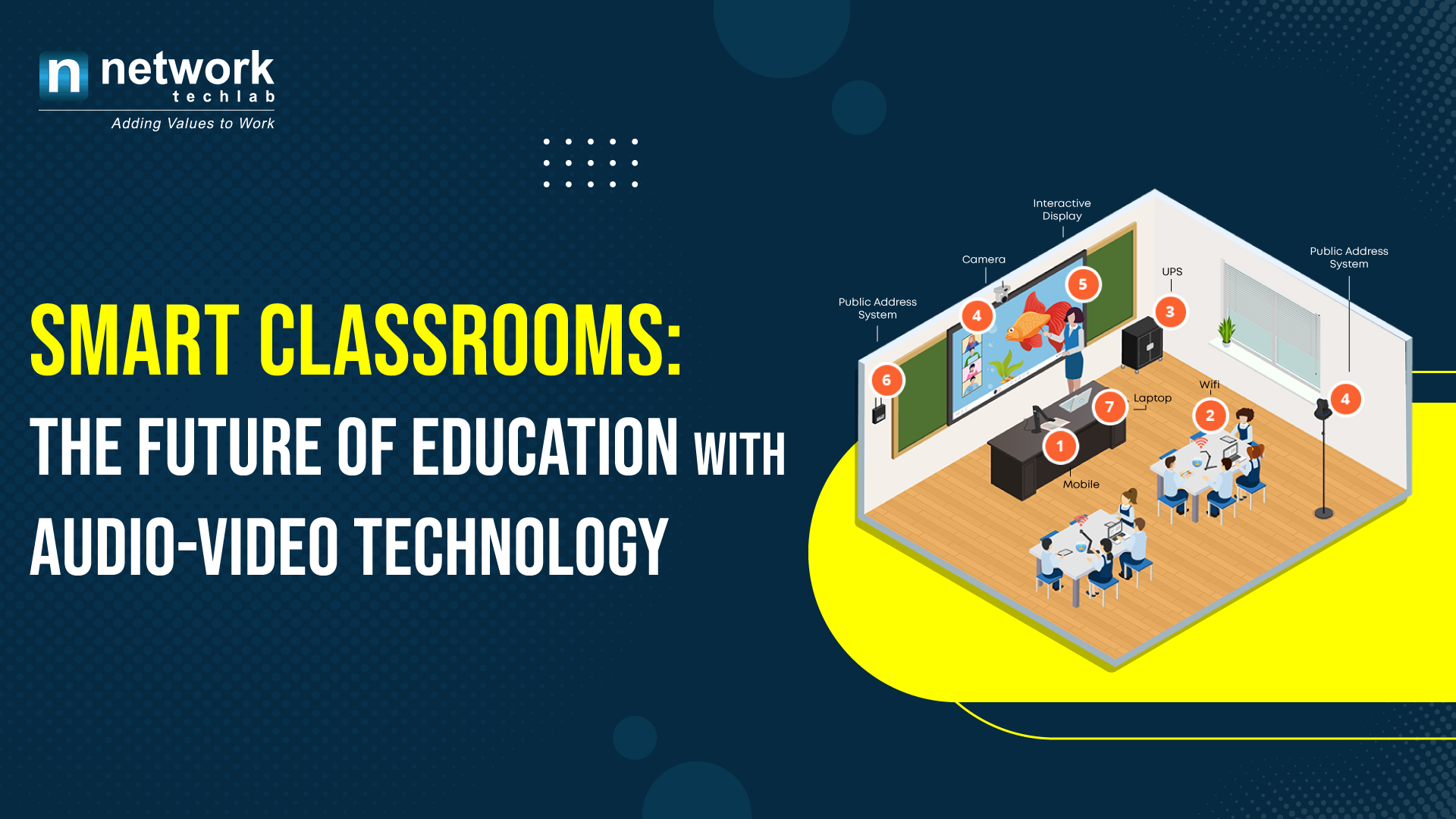
The most visible part of an OSC Classroom is the hardware. In a traditional online class, a teacher might use a webcam and a microphone. In an OSC setup, the technology is significantly more robust, designed to mimic the depth of an in-person experience.
First, there is the audio-visual routing system. This is the unsung hero of the setup. It involves high-fidelity microphone arrays that can isolate the teacher’s voice from background noise, paired with 4K cameras that offer variable zoom and pan capabilities. These aren't static shots. The technology often includes eye-tracking or automatic framing that keeps the instructor and the primary learning material in view simultaneously.
Then there is the dual-screen paradigm. One display is dedicated to the presenter (the teacher or the content source), and the other is dedicated to the participants. This isn't just a matter of preference; it’s about reducing cognitive load. When students have to toggle between a shrink-wrapped video of a student and the main content, they lose focus. The OSC hardware splits this naturally, ensuring that remote students feel "present" without cluttering the primary instructional space.
The Software Stack: Latency and Interactivity
Hardware gets the image and sound from Point A to Point B, but the software determines whether the interaction feels human. The core technology here revolves around WebRTC (Web Real-Time Communication) and proprietary adaptive bitrate streaming.
Latency is the enemy of engagement. In a standard webinar, there might be a 300-millisecond delay. It’s subtle, but enough to make conversation feel clunky. OSC platforms engineer their architecture to minimize this, often using lightweight containerized protocols that prioritize audio synchronization over video fidelity when bandwidth drops. If your internet stutters, the audio stays crisp so you don’t lose the thread of the lecture.
Beyond basic streaming, the software layer includes interactive whiteboard technology. This isn’t just drawing on a screen. It’s a collaborative canvas where annotations made by a remote student appear instantly on the instructor’s tablet and the main projector. This bidirectional communication relies on state-synchronization algorithms, ensuring that if two students draw at the same time, the system resolves the conflict without glitching.
Integration with LMS and Analytics
Perhaps the most critical, yet least visible, component of the OSC ecosystem is its integration with Learning Management Systems (LMS) like Canvas, Blackboard, or Moodle. Modern education isn’t about watching videos; it’s about tracking progress.
When a student logs into an OSC Classroom session, the platform doesn’t just record attendance. It uses API hooks to pull enrollment data and push engagement metrics back to the LMS. This means the instructor can see who joined, how long they stayed, and even which slides triggered the most questions, all without leaving their course dashboard.
This data layer is where the "Smart" come into play for "Smart Classrooms." Predictive analytics can flag students who are consistently disengaged or failing to submit pre-lecture materials. It transforms the classroom from a passive broadcasting tool into an active feedback loop.
The Pedagogical Engine: Why Tech Alone Isn’t Enough
It is tempting to think of the "technology behind OSC Classrooms" purely in terms of code and silicon. However, the most sophisticated element is the blended learning framework that the technology supports.
The tech is designed for the "flipped classroom" model. Students review materials asynchronously. The live OSC session is then reserved for high-order thinking: discussion, problem-solving, and collaboration. The technology enables this by allowing rapid switching between lecture mode, breakout groups, and collaborative polling.
For example, during a chemistry lesson, the instructor can share a virtual lab simulation. The OSC platform overlays this simulation with a discussion forum and a voice channel, allowing students to debate molecular structures while manipulating the 3D models. This seamless switch between media types is a specific feature requirement built into the software kernel.
Challenges and Future Directions
Despite the sophistication, the technology isn't perfect. Bandwidth inequality remains a hurdle. While the OSC platform can adapt to lower speeds, the depth of interaction suffers. Futuristic prospects include AI-driven summarization, where the system automatically generates transcripts and highlights key concepts for absent students.
Additionally, the rise of VR/AR integration is on the horizon. Imagine an OSC Classroom where remote students don't just see a 3D model of a cell, but can walk around it in a shared virtual space. The underlying technology for this—spatial computing and low-latency cloud rendering—is already being tested in beta environments.
FAQ: Common Questions About OSC Classroom Technology
- Do I need a powerful computer to use OSC Classrooms?
Usually, no. The heavy processing is often done on the cloud side or through browser-based WebRTC technologies. A mid-range laptop with a stable internet connection is typically sufficient. - Is my data secure in these platforms?
Reputable OSC providers use end-to-end encryption for video streams and comply with major data protection regulations (like FERPA or GDPR) since they handle student records via LMS integration. - Can I use OSC technology for non-STEM subjects?
Absolutely. While it started in science centers, the collaborative whiteboards, polling, and breakout room features are effective for humanities, business, and language learning. - What is the biggest technical bottleneck?
Local network stability. The platform can adapt to poor internet, but if the local Wi-Fi is congested, even the best software struggles to maintain low latency.