How a Chipset Acts as Your Motherboard’s Brain
When you stare at the innards of a desktop or laptop, the chipset is the quiet hero that most people overlook. It’s not just a bundle of circuits; it’s the central hub that decides how fast data travels, which devices can talk to each other, and how efficiently power is used. In other words, the chipset is the motherboard’s brain.
What Exactly Is a Chipset?
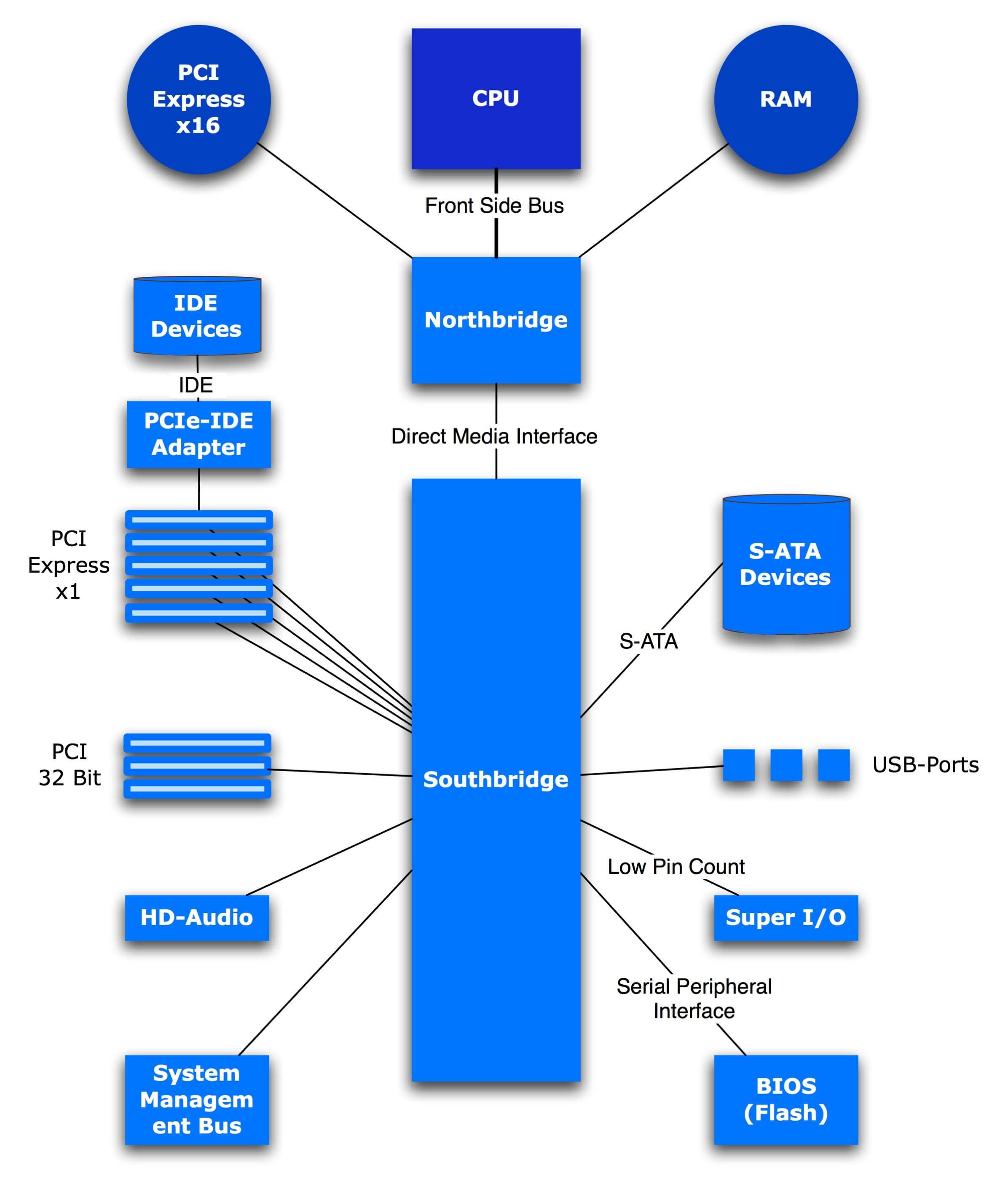
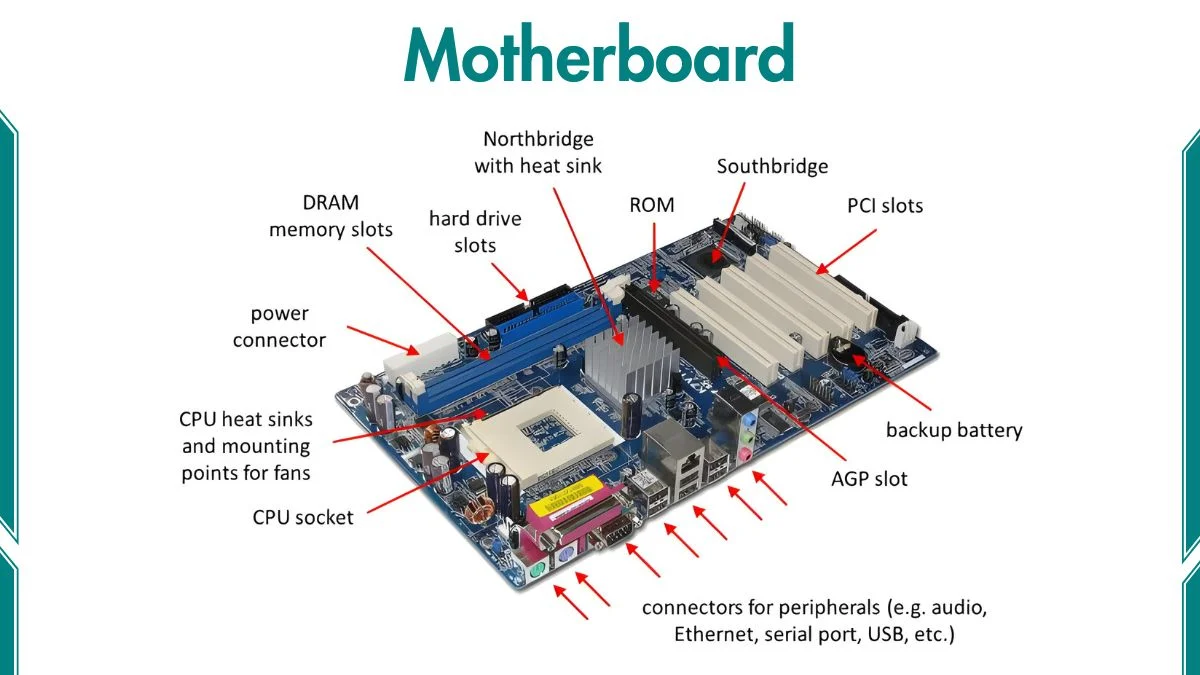
The term “chipset” refers to a collection of integrated circuits that sit beside the CPU on the motherboard. Historically, manufacturers split the chipset into two components: the Northbridge and the Southbridge. Modern designs have largely merged those functions, but the idea remains the same—one set of chips controls high‑speed communication, another handles slower peripherals.
Think of it like a city’s traffic control system. The Northbridge directs the expressways (CPU‑memory and GPU links), while the Southbridge manages side streets (USB, SATA, audio, etc.). The chipset decides which lane each packet of data should take, keeping everything moving smoothly.
Key Roles of the Chipset
- Memory Interface: Determines the type (DDR4, DDR5) and speed of RAM you can install.
- PCIe Lanes Allocation: Controls how many lanes go to graphics cards, NVMe SSDs, or other expansion cards.
- Peripheral Connectivity: Provides ports for USB, Ethernet, audio, and storage devices.
- Power Management: Regulates voltage to the CPU and other components, affecting stability and efficiency.
- Integrated Features: On‑board Wi‑Fi, Bluetooth, and even basic graphics are often part of the chipset.
Northbridge vs. Southbridge: A Quick History
In the early days of PC building, the Northbridge handled the heavy lifting—communication between the CPU, RAM, and the graphics card. The Southbridge took care of everything else: hard drives, USB, audio, and legacy ports. As CPUs grew smarter, they began to absorb many Northbridge duties, leaving the Southbridge to evolve into what we now call the “chipset controller.”
Today, you’ll rarely see a distinct Northbridge chip on a consumer board. Instead, the CPU’s integrated memory controller and PCIe lanes dominate the high‑speed side, while the chipset (still technically the Southbridge) handles the rest.
How Chipset Choice Impacts Your Build
Choosing a motherboard isn’t just about aesthetics or price; the chipset defines the ceiling of what your system can do.
Performance Limits
Older chipsets may cap the maximum RAM speed at, say, 2666 MHz, even if the CPU can handle more. Similarly, a low‑end chipset might only provide a handful of PCIe 3.0 lanes, limiting you to a single NVMe drive and a modest graphics card.
Feature Set
Look for built‑in Wi‑Fi 6, USB‑Type C, or Thunderbolt support. Those aren’t universal; they’re dictated by the chipset’s I/O capabilities. A high‑end chipset often bundles the newest interfaces, while budget options may lag behind.
Future‑Proofing
When you upgrade the CPU later, the chipset may become the bottleneck. For example, a motherboard built around an older chipset might not support the latest PCIe 5.0 standard, even if the new CPU does.
Popular Chipsets for Today’s Platforms
Here’s a snapshot of the most common families you’ll encounter in 2024.
- Intel Z790: Flagship for 13th‑gen Core processors, offering PCIe 5.0, DDR5 support, and extensive overclocking features.
- Intel B760: Mid‑range alternative, still PCIe 5.0 ready but with fewer USB‑4 ports and limited overclocking.
- AMD X670E: Premium AMD chipset, fully embraces PCIe 5.0 and DDR5, plus robust power delivery for enthusiasts.
- AMD B650: Budget-friendly, balances newer features with a modest lane count—good for office builds or light gaming.
Practical Tips for Picking the Right Chipset
- List the components you plan to use (GPU, SSDs, Wi‑Fi). Then match the required lanes and ports.
- Check the RAM specification your CPU supports and ensure the chipset can handle the same speed.
- Consider future upgrades—if you might add a second NVMe drive, verify the chipset provides enough M.2 slots.
- Don’t forget BIOS updates; a newer chipset may need a firmware flash to support the latest CPUs.
Common Misconceptions
“The chipset is just a glorified hub.” Not quite. While it does route data, it also enforces timing, error correction, and power sequencing. Those low‑level tasks can make or break system stability.
“All motherboards with the same chipset are identical.” The chipset is only part of the equation. Manufacturer designs—VRM quality, cooling solutions, and extra features—can vary dramatically even on the same chipset.
Wrapping Up
The chipset may sit in the shadows of the CPU and GPU, but its role as the motherboard’s brain is undeniable. Understanding how it allocates lanes, manages power, and dictates peripheral support gives you a clearer picture of what your PC can truly do. Whether you’re building a high‑performance gaming rig or a modest office workstation, the right chipset choice lays the groundwork for a stable, future‑ready system.