How Laser Jet Printers Work and What Makes Them So Good
If you’ve ever pulled a crisp, black‑and‑white page from a office printer and wondered what magic turned a digital file into that perfect sheet, you’re not alone. Laser jet printers have been quietly powering businesses, schools, and home offices for decades, delivering speed and sharpness that inkjets still chase. Let’s pull back the curtain and explore the inner workings of these workhorses, and see why they remain a top choice for many users.
Inside the Machine: The Core Process
At first glance a laser printer looks like a box with a few rollers and a toner cartridge, but the real action happens inside a tightly timed dance of light, electricity, and finely powdered ink.
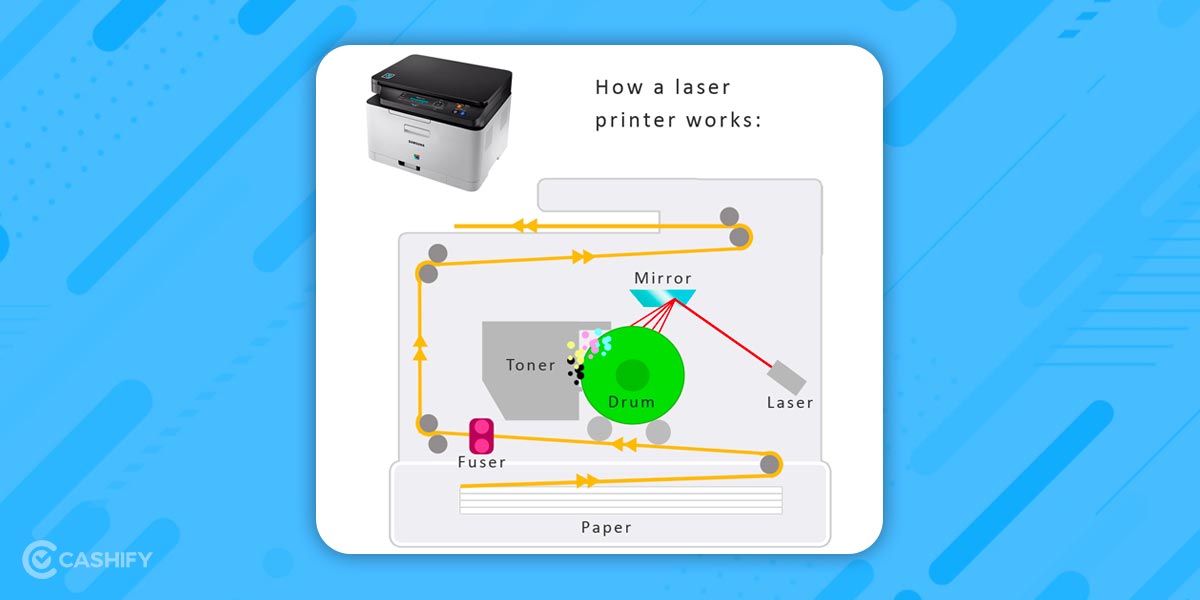
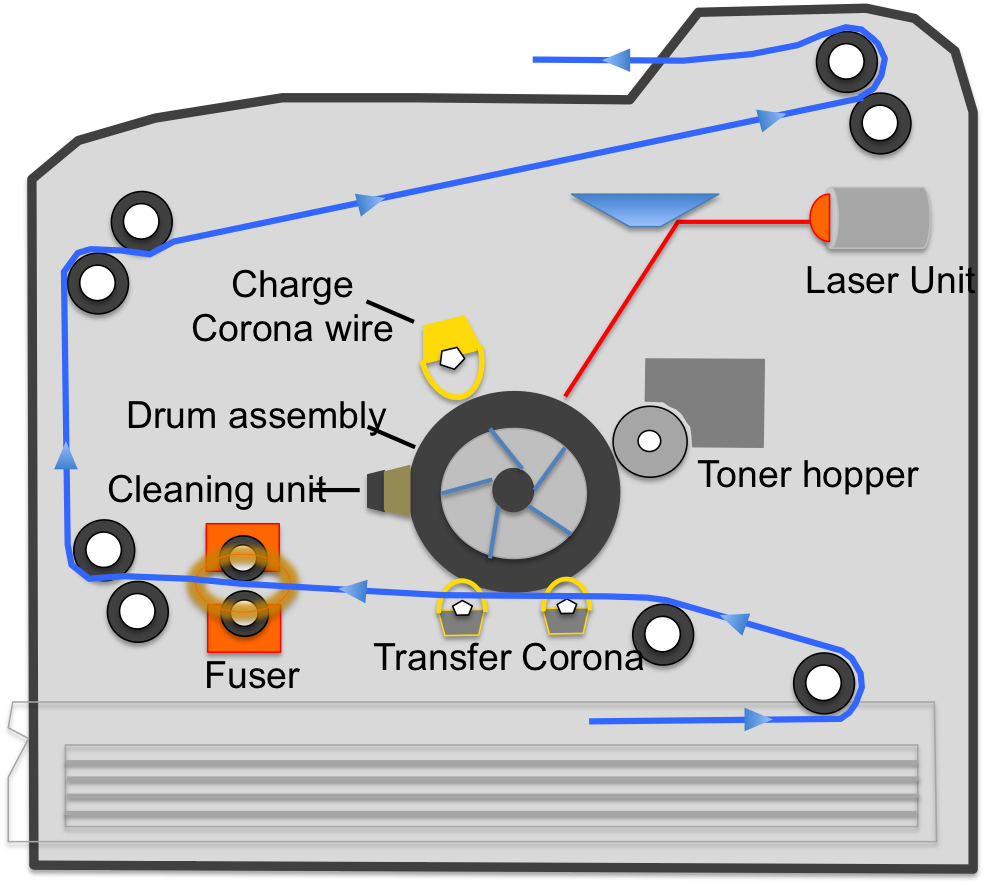
- Charging the drum: A rotating photoreceptor drum gets an even electric charge from a high‑voltage corona wire or a charging roller.
- Laser exposure: A tiny laser beam, guided by a rotating polygon mirror, writes the image line by line onto the drum. Wherever the laser hits, it discharges the surface, creating a latent electrostatic image.
- Toner adhesion: Negatively charged toner particles are attracted only to the discharged areas, sticking precisely where the laser “drew” the picture.
- Transfer to paper: The drum rolls over a sheet of paper that has been given an opposite charge. The toner lifts off the drum and jumps onto the paper.
- Fusing: Finally, the paper passes through heated fuser rollers. The heat melts the toner, bonding it permanently to the fibers.
This sequence repeats thousands of times per minute in a high‑speed office model, producing up to 45 pages in a single minute.
Why Laser Jet Printers Feel “Awesome”
Beyond the cool factor of lasers, several practical benefits keep them at the top of the printing game.
Speed and Efficiency
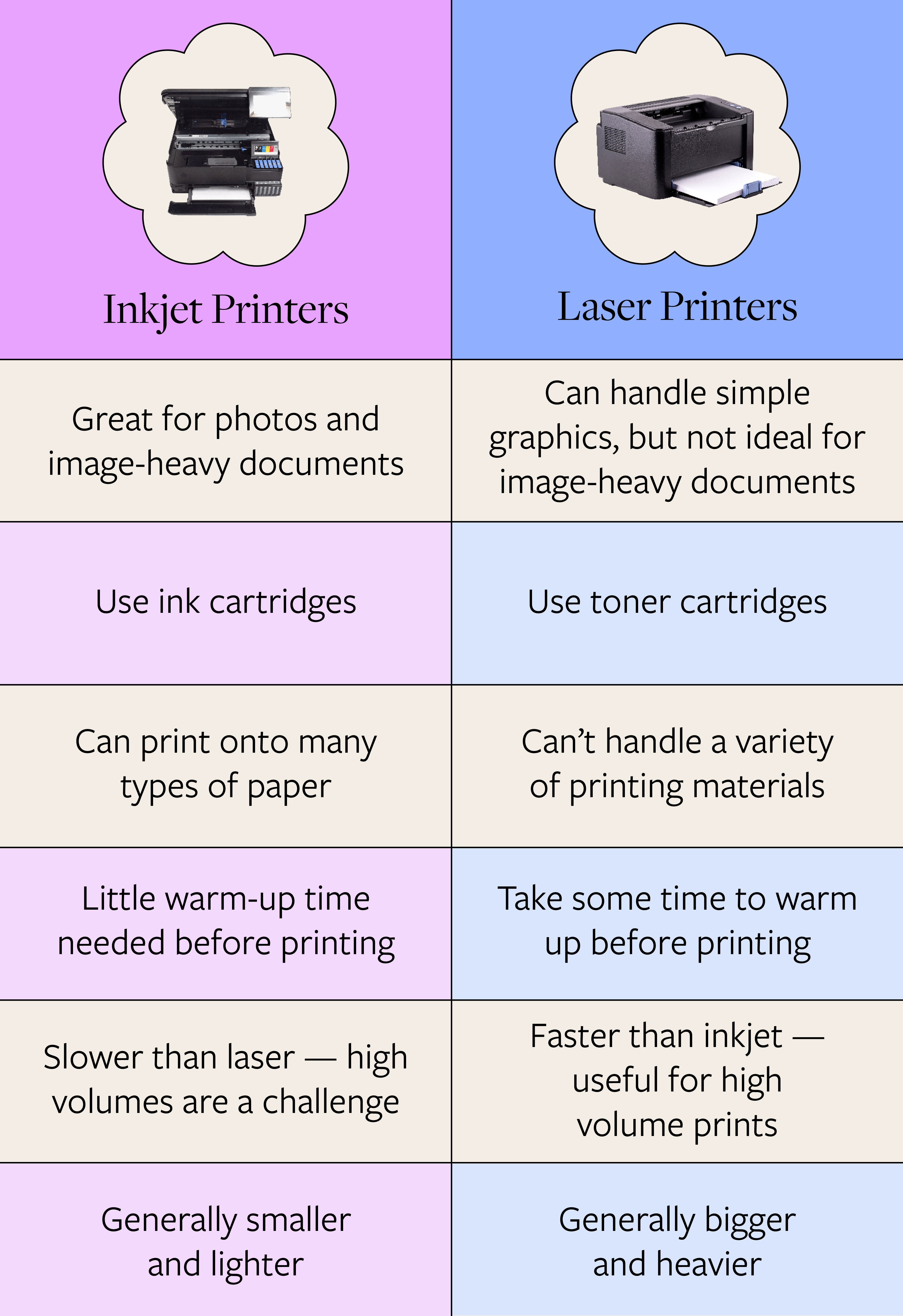
Laser printers excel at high‑volume jobs. Since the drum can print an entire page in a single pass, they avoid the multiple sweeps inkjets need for color layers. The result? Faster first‑page-out times and less idle waiting.
Sharp Text and Fine Details
Because toner particles are precisely placed by the laser, the resulting text is razor‑sharp, ideal for contracts, reports, and any document where readability matters. Small graphics and line art also come out crisp, something many cheap inkjets struggle with.
Cost Per Page
While the upfront price of a laser printer can be higher, the cost of toner per page often drops below that of ink cartridges. For users who print hundreds of pages a month, the savings quickly add up.
Longevity and Low Maintenance
Laser machines have fewer moving parts than their inkjet counterparts. No printhead nozzles to clog, no frequent ink refills. As long as you replace the drum or toner when needed, the printer can run reliably for years.
Choosing the Right Laser Printer for You
Not all laser printers are created equal, and picking the best fit depends on a few key factors.
- Print volume: Small home offices may be fine with a compact monochrome model, while a busy department might need a high‑capacity, duplexing workstation.
- Color vs. monochrome: If you mostly print text, a black‑and‑white unit saves money. For occasional charts or presentations, a color laser adds versatility.
- Connectivity: Look for Wi‑Fi, Ethernet, or mobile printing support if you need to print from multiple devices.
- Paper handling: Check the tray capacity and supported media types—labels, envelopes, cardstock—especially if you have specialized needs.
Common Misconceptions
Despite their reputation, laser printers aren’t a perfect fit for every scenario.
“They’re too noisy.” Modern office models have improved acoustics, and many home units operate quietly enough for an open office.
“Toner is always more expensive than ink.” While cartridge prices can seem high, the yield—often several thousand pages—means the per‑page cost can be lower than inkjet cartridges.
“Laser printers can’t handle photos.” True, they aren’t the go‑to for glossy photo prints, but their color models produce acceptable quality for drafts and internal documents.
Maintaining Peak Performance
Even the toughest laser printers benefit from a little TLC.
- Replace the drum unit before print quality degrades; many models alert you when it’s time.
- Keep the interior clean—dust can affect the laser path and cause streaks.
- Use the recommended paper type; overly thick or low‑quality stock can jam the fuser.
- Store spare toner in a cool, dry place to prevent clumping.
Future Trends: What’s Next for Laser Printing?
Laser technology isn’t standing still. Manufacturers are exploring smaller, more energy‑efficient lasers, solid‑state fusers that heat up faster, and even integrated security chips to protect confidential documents. As remote work persists, we may also see more compact, wireless laser models aimed at the home office market.
In the end, the appeal of laser jet printers lies in a blend of speed, precision, and long‑term cost efficiency. Whether you’re printing a single contract or a daily batch of reports, understanding how these devices work helps you appreciate why they’ve stayed relevant for so long—and why they’re likely to keep impressing users for years to come.