How to Fix the OCSP Response Error: MalformedRequest Explained
When you browse a secure site and suddenly see “OCSP response error: MalformedRequest,” the page often stalls or throws a scary warning. It’s not a virus, but a hiccup in the certificate‑validation handshake that can leave both users and admins puzzled. Below we break down what triggers this error, how to spot it in logs, and practical steps to get things working again.
What Is OCSP and Why Does It Matter?
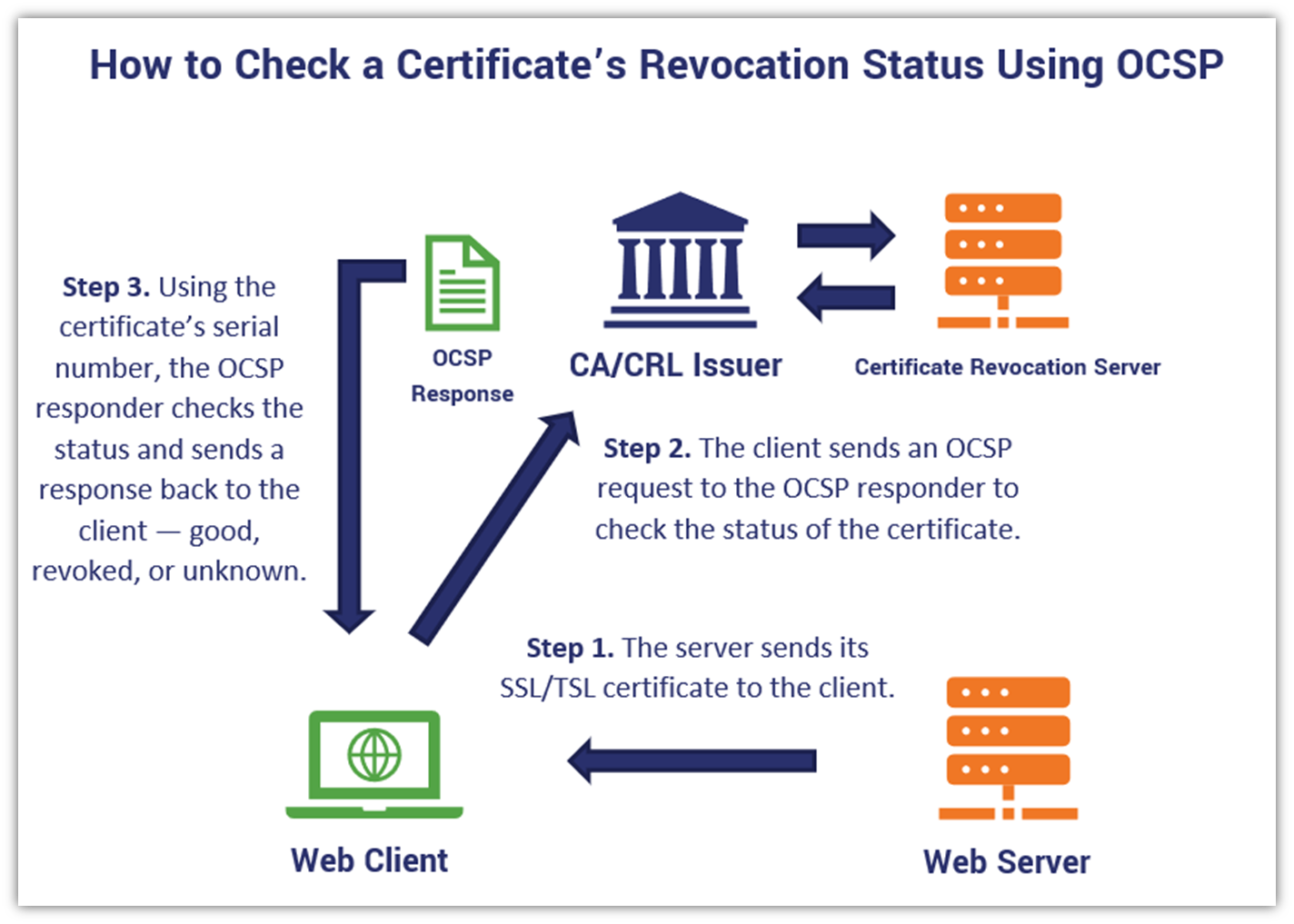
OCSP (Online Certificate Status Protocol) is the modern replacement for certificate revocation lists. Instead of downloading a bulky list, a client asks an OCSP responder – a server run by the certificate authority (CA) – “Is this certificate still good?” The responder replies with a signed answer, and the browser proceeds if the response looks healthy.
If the reply is malformed, the client can’t trust the certificate, and the connection is aborted. That’s where the “MalformedRequest” error appears.
Typical Triggers for a MalformedRequest
- Incorrect request format – The client may send a request that doesn’t follow RFC 6960 specifications, often due to outdated libraries.
- Proxy interference – Some corporate proxies rewrite or truncate the request payload, leaving the OCSP server unable to parse it.
- Time‑skew issues – If the client’s clock is far off, timestamps inside the request can appear invalid, causing the responder to reject it.
- Misconfigured server – A reverse proxy or load balancer that terminates TLS may be set to forward OCSP requests incorrectly.
How to Identify the Problem in Your Environment
Start with the easiest clues.
Check Browser Console or System Logs
Most modern browsers expose the exact error code in the console. Look for lines that mention OCSP or MalformedRequest. On Windows, the Event Viewer may log a Schannel warning; on Linux, syslog or journalctl often contains a SSL tag.
Capture the Network Traffic
Using Wireshark or tcpdump can reveal the raw OCSP request and the server’s response (or lack thereof). If the request payload is missing fields or looks truncated, you’ve likely found the culprit.
Inspect the Certificate Chain
Run openssl s_client -connect example.com:443 -status. If the chain contains an “OCSP Must-Staple” extension, the client expects a stapled response from the server. A missing or malformed stapled response can provoke the same error.
Step‑by‑Step Fixes
Below is a practical checklist you can follow, adjusting for the environment you manage.
- Update TLS libraries: Ensure OpenSSL, GnuTLS, or the Windows SChannel stack is current. Many “MalformedRequest” bugs were patched in versions released after 2020.
- Synchronize clocks: Deploy NTP on all servers and workstations. A drift of more than a few minutes can break OCSP timing checks.
- Review proxy settings: If you use a forward or reverse proxy, disable any HTTP body‑modification rules for
application/ocsp-request. If you must inspect traffic, configure the proxy to tunnel OCSP over CONNECT. - Enable proper stapling: On Apache, add
SSLUseStapling onand pointSSLStaplingResponderTimeoutto a healthy OCSP responder. On Nginx, usessl_stapling on;andssl_stapling_verify on;. - Test with a known‑good responder: Temporarily point your server to the CA’s public OCSP endpoint (e.g.,
http://ocsp.int-x3.letsencrypt.org) to see if the error disappears. If it does, the issue likely lies in a private responder configuration. - Check firewall rules: Some firewalls block OCSP traffic on port 80/443 for unknown hosts. Whitelist the responder’s IP range.
When to Reach Out to the Certificate Authority
If you’ve ruled out client‑side glitches and proxy interference, the problem may sit on the CA’s side. Contact support with the following details:
- Exact error line from logs.
- Timestamped capture of the malformed request (redacted if sensitive).
- CA‑issued certificate serial number.
- Any custom responder URL you’re using.
Most reputable CAs will investigate quickly; they may need to regenerate the OCSP signing certificate or adjust rate‑limiting rules.
Preventing Future MalformedRequest Errors
Proactivity saves time. Consider these long‑term habits:
- Automate certificate renewal with tools like
certbotoracme.sh, which automatically configure OCSP stapling. - Monitor OCSP health using a simple script that queries the responder daily and alerts on non‑200 responses.
- Document proxy exceptions for OCSP traffic in your network policy, so new devices inherit the correct rules.
- Regularly audit time synchronization across all nodes; a single drifted server can cascade failures.
With these practices in place, the “OCSP response error: MalformedRequest” message should become a rare footnote rather than a daily roadblock.