How to Link Supabase Auth with Your Users Table Using JOINs
When you first spin up a Supabase project, the auth schema gives you a ready‑made users table that stores credentials, email verification status, and a few profile fields. Most apps, however, need a richer user profile—addresses, preferences, subscription tiers, you name it. The usual pattern is to create a separate profiles (or users) table and then join it to the built‑in auth table. Below, we walk through the concepts, the SQL you’ll actually type, and a few pitfalls to watch out for.
Why Separate Tables Make Sense
The auth table (named auth.users) is managed by Supabase’s authentication service. It’s purpose‑built for security: password hashes, MFA settings, and session tokens live there. Adding custom columns directly to this table is possible, but it couples business logic to the auth layer and can complicate migrations. By keeping a dedicated public.users (or profiles) table, you:
- Maintain a clear boundary between authentication data and domain‑specific data.
- Gain flexibility to evolve the profile schema without touching auth internals.
- Make it easier to apply row‑level security (RLS) policies that differ from auth policies.
All that said, the two tables must talk to each other, and that’s where a JOIN comes in.
Setting Up the Users Table
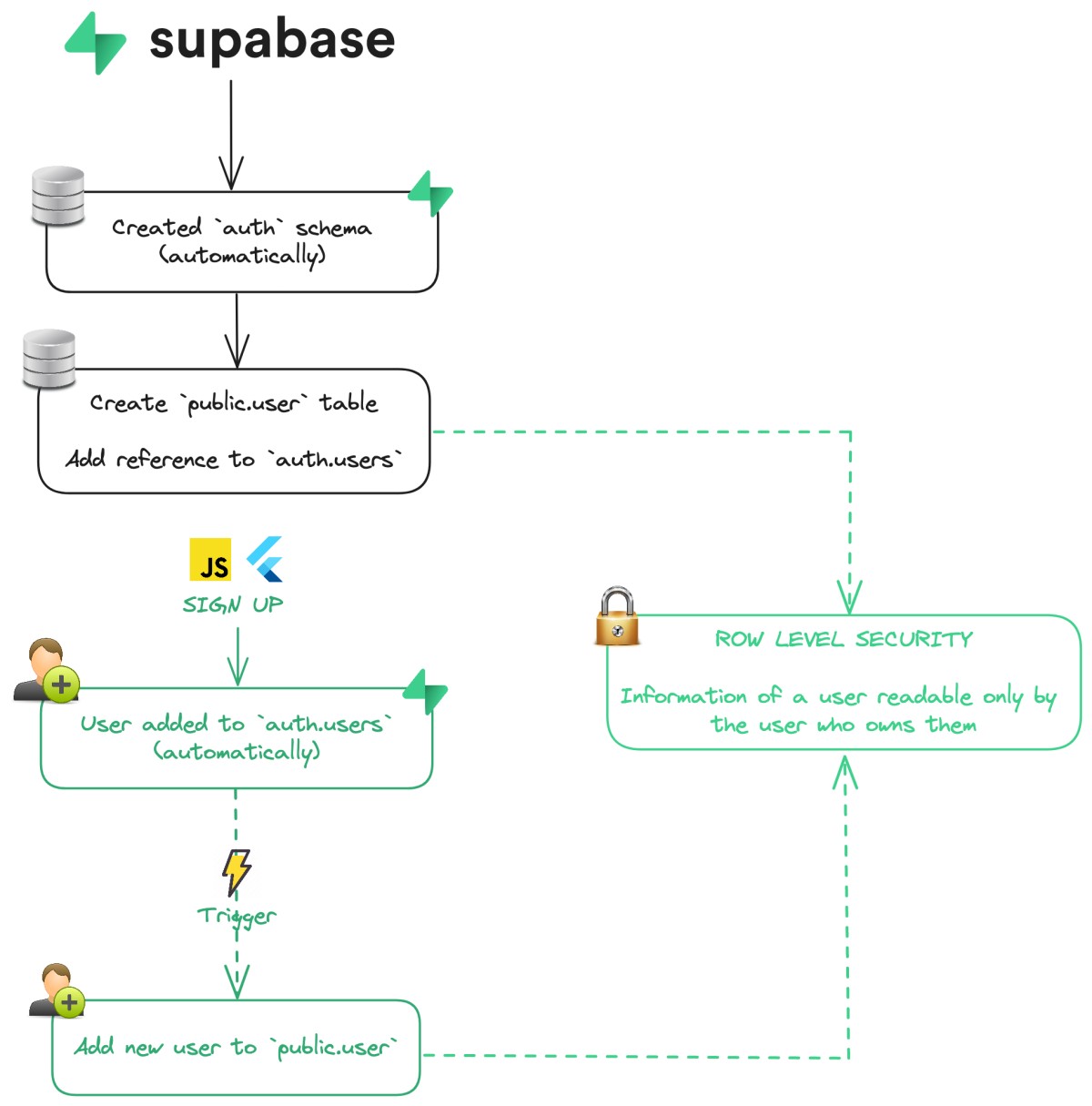
First, create a table that references the auth user’s UUID. The auth.users table uses the column id as the primary key, so you’ll store that value as a foreign key.
create table public.users (id uuid primary key references auth.users(id),
full_name text,
avatar_url text,
created_at timestamp default now()
);
Note the references clause—Supabase will enforce that every row in public.users corresponds to a valid auth record. If you already have a table, just add the foreign key with alter table.
Inserting a Profile When a User Signs Up
Supabase lets you hook into the authentication flow via auth triggers. A common pattern is to create an INSERT trigger on auth.users that automatically seeds a row in your public.users table.
create function public.create_user_profile()returns trigger as $$
begin
insert into public.users (id) values (new.id);
return new;
end;
$$ language plpgsql security definer;
create trigger on_auth_user_created
after insert on auth.users
for each row execute function public.create_user_profile();
This way, you never have to remember to call a second insert from your client code; the database handles it instantly.
Fetching Combined Data with a JOIN
Now the fun part—pulling a user’s auth details together with their profile. A straightforward inner join does the job:
selecta.id,
a.email,
a.email_confirmed_at,
u.full_name,
u.avatar_url,
u.created_at
from auth.users as a
join public.users as u
on a.id = u.id
where a.id = 'the‑user‑uuid';
If you only need the profile for the currently logged‑in user, Supabase’s client libraries can inject the JWT’s sub claim automatically, letting you write:
selecta.email,
u.full_name,
u.avatar_url
from auth.users a
join public.users u on a.id = u.id
where a.id = auth.uid();
The auth.uid() function extracts the user ID from the request’s auth token, keeping the query safe from injection and ensuring row‑level security works as intended.
Row‑Level Security Considerations
Supabase’s RLS policies protect data at the row level. For the combined query to succeed, you’ll need policies on both tables. A typical setup looks like this:
- auth.users: allow the user to read their own row.
create policy "self read" on auth.usersfor select using (auth.uid() = id);
- public.users: mirror the same rule.
create policy "self read profile" on public.usersfor select using (auth.uid() = id);
With these policies in place, the join respects both sides, and no extra permissions are needed.
Handling Missing Profiles Gracefully
Sometimes a user might exist in auth.users but not yet have a profile row—perhaps the trigger failed or you’re working with legacy data. An LEFT JOIN prevents the whole query from returning empty:
selecta.email,
u.full_name,
u.avatar_url
from auth.users a
left join public.users u on a.id = u.id
where a.id = auth.uid();
If u.full_name comes back null, you can fall back to a placeholder on the client side.
Updating Both Tables in One Transaction
When a user changes their email and their display name at the same time, you might think of sending two separate requests. You can wrap the updates in a single transaction to guarantee atomicity:
begin;update auth.users
set email = 'new@example.com',
email_confirmed_at = null
where id = auth.uid();
update public.users
set full_name = 'New Name'
where id = auth.uid();
commit;
Supabase’s SQL editor, the dashboard, or any client that supports multi‑statement queries can run this block.
Common Pitfalls and How to Avoid Them
- Forgot to enable RLS: By default, Supabase tables are open. Turning on RLS after data exists can unintentionally lock everyone out if policies aren’t added first.
- Mismatched UUID formats: Ensure you always store the auth
idas auuidcolumn, not as text. Conversions can cause silent mismatches in joins. - Trigger recursion: A trigger that writes back to
auth.userscan cause an infinite loop. Keep triggers focused on the profile table only.
Putting It All Together – A Quick Recap
1. Create a public.users table with a uuid foreign key to auth.users(id).
2. Add an INSERT trigger so every new auth record gets a profile row automatically.
3. Write an inner join (or left join) that pulls fields from both tables, using auth.uid() for safety.
4. Apply matching RLS policies on both tables so the join respects your security model.
5. Use transactions for multi‑table updates and watch out for common mistakes.
FAQ
Do I have to store the auth UUID in my profile table?
While it’s technically possible to duplicate data, using the auth UUID as the primary key creates a one‑to‑one relationship and lets the database enforce referential integrity.
Can I add custom columns directly to auth.users?
You can, but it mixes business data with authentication data, which can complicate migrations and security policies. Keeping a separate table is generally cleaner.
What if I need to query many users at once?
Use the same join pattern without the where clause, and let Supabase’s pagination utilities handle large result sets.
Is there a way to hide the auth table from the client?
Yes—expose only a view that selects the joined columns you want, and grant the client role read access to that view instead of the raw auth.users table.