Is Google's Speed Test Right For You?
When it comes to measuring internet speed, there are numerous options available, but one of the most popular and widely used is Google's Speed Test. This tool, provided by Google, allows users to test their internet speed with just a few clicks. But is it the right choice for you? In this article, we'll delve into the features, benefits, and limitations of Google's Speed Test to help you decide.
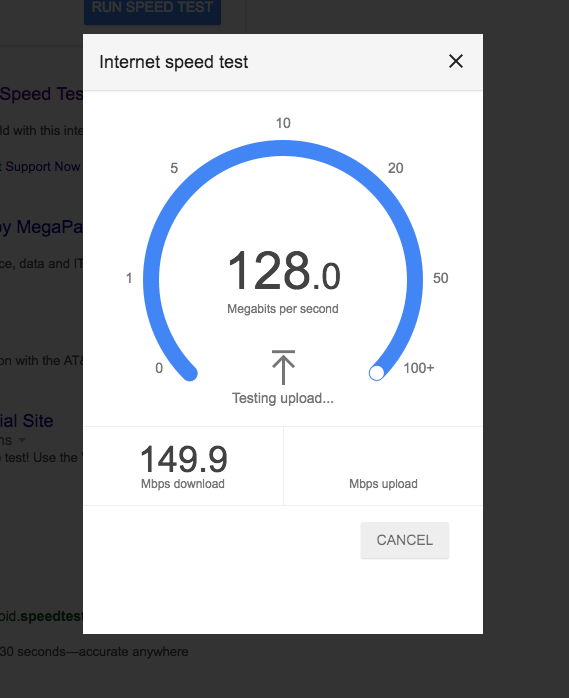
Google's Speed Test is incredibly easy to use. Simply visit the website, click the "Run Speed Test" button, and the tool will begin measuring your internet speed. The test typically takes around 30 seconds to complete, and once it's finished, you'll be presented with your download and upload speeds, as well as your ping time. But what do these numbers mean, and how can you use them to your advantage?
Understanding Your Speed Test Results
When you run a speed test using Google's tool, you'll receive three key pieces of information: download speed, upload speed, and ping time. Download speed refers to how quickly you can retrieve data from the internet, while upload speed measures how fast you can send data to the internet. Ping time, on the other hand, is a measure of the time it takes for data to travel from your device to a server and back. These numbers can be useful for identifying potential issues with your internet connection and determining whether your internet service provider (ISP) is delivering the speeds they promise.
For example, if you're experiencing slow load times when streaming videos, a low download speed may be the culprit. Similarly, if you're having trouble uploading files to cloud storage, a slow upload speed could be the problem. By understanding your speed test results, you can better diagnose and troubleshoot issues with your internet connection.
Benefits and Limitations of Google's Speed Test
So, what are the benefits of using Google's Speed Test? For one, it's incredibly convenient and easy to use. The tool is also free, and you don't need to create an account or provide any personal information to use it. Additionally, Google's Speed Test is widely available and can be accessed from anywhere with an internet connection. However, there are some limitations to consider. For example, the test is only measuring the speed of your internet connection at a single point in time, and it may not reflect your typical internet speeds. Additionally, the test is only measuring the speed of your connection to Google's servers, which may not be representative of your overall internet experience.
Another potential limitation of Google's Speed Test is that it may not provide the most accurate results. This is because the test is designed to measure the speed of your connection to Google's servers, which may not be the same as the speed of your connection to other websites or online services. For example, if you're experiencing slow speeds when accessing a specific website, Google's Speed Test may not accurately reflect the issue.
Alternatives to Google's Speed Test
While Google's Speed Test is a popular and convenient option, it's not the only game in town. There are numerous other speed test tools available, each with their own strengths and weaknesses. For example, Speedtest.net is another popular option that provides a more detailed breakdown of your internet speeds, including a graph of your connection's performance over time. Other options, such as Fast.com and TestMy.net, offer additional features like the ability to test your connection's performance on multiple servers and measure your connection's latency.
Ultimately, the choice of which speed test tool to use will depend on your specific needs and preferences. If you're looking for a quick and easy way to test your internet speed, Google's Speed Test may be a good choice. However, if you're looking for more detailed information or want to test your connection's performance on multiple servers, you may want to consider an alternative option.
Frequently Asked Questions
- Q: How accurate is Google's Speed Test? A: Google's Speed Test is generally accurate, but it may not reflect your typical internet speeds or provide the most accurate results in all situations.
- Q: Can I use Google's Speed Test on my mobile device? A: Yes, Google's Speed Test is available on mobile devices and can be accessed through your device's web browser.
- Q: How often should I run a speed test? A: It's a good idea to run a speed test periodically to ensure your internet connection is performing as expected and to identify any potential issues.
- Q: Can I use Google's Speed Test to test my ISP's speeds? A: Yes, Google's Speed Test can be used to test your ISP's speeds and determine whether they are delivering the speeds they promise.
In conclusion, Google's Speed Test is a convenient and easy-to-use tool for measuring internet speed. While it has some limitations, it can be a useful tool for diagnosing and troubleshooting issues with your internet connection. By understanding your speed test results and considering alternative options, you can make informed decisions about your internet service and ensure you're getting the speeds you need.