How to Find Florida Arrest Records Online on Arrest.org
Ever wondered where to look when you need a quick snapshot of someone’s recent encounter with law enforcement in the Sunshine State? The answer often lands on a single website that consolidates public documents: Arrest.org. While the platform isn’t a government portal, it pulls data from official sources and presents it in a format most folks can read without a legal degree.
What Arrest.org Actually Offers
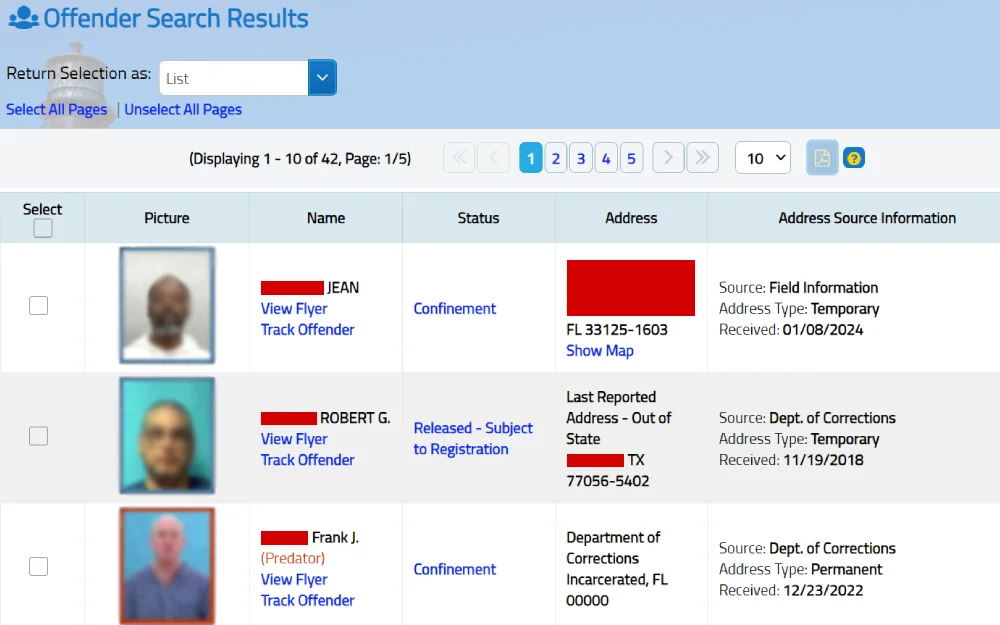
At its core, Arrest.org aggregates publicly available arrest logs, booking photos, and charge details from county sheriffs, city police departments, and the Florida Department of Corrections. Think of it as a searchable newspaper archive, except the headlines are “arrest” notices and the photos are mugshots.
- Basic personal data: Full name, age, and known aliases.
- Charge summary: The statutes cited and whether the offense is a misdemeanor or felony.
- Booking information: Date of arrest, booking location, and, in many cases, a photo taken at intake.
- Case status: Whether the individual remains in custody, has been released on bail, or the case has been dismissed.
All of this is compiled without asking you to fill out a maze of forms—just type a name and hit Enter.
Step‑by‑Step Guide to Running a Search
Getting the data you need is surprisingly straightforward. Follow these moves, and you’ll have a report in under five minutes.
- Visit the site. Open your browser and go to www.arrest.org. The homepage greets you with a clean search bar; no ads or pop‑ups demanding a subscription.
- Select “Florida” from the state dropdown. The site covers all 50 states, so narrowing the scope eliminates irrelevant hits.
- Enter the name. Spell it as accurately as possible—middle initials help weed out false matches.
- Apply optional filters. You can limit results by county (e.g., Miami‑Dade, Broward), by date range, or by charge type.
- Click “Search.” A list appears, usually within seconds, showing each record that matches your criteria.
- Review the details. Click any entry for a full breakdown: the exact charge, booking time, and, if available, a mugshot.
- Download or print. For personal records or legal prep, the site lets you export a PDF version of the record.
That’s it. If the name returns dozens of hits, you might need to sift through them, but the filters let you narrow it down quickly.
Why Some Searches Come Up Empty
Not every arrest makes it onto the public feed. A few common reasons include:
- Sealed or expunged cases. When a judge orders a record to be sealed, it disappears from public databases, including Arrest.org.
- Recent arrests. It can take up to 48 hours for the official log to be uploaded to the site.
- Jurisdiction gaps. Small towns sometimes use separate systems that aren’t yet integrated with the national feed.
If you hit a dead end, consider checking the specific county sheriff’s website or filing a request under the Florida Sunshine Law.
Tips for Interpreting the Information
Reading an arrest report isn’t the same as reading a court judgment. Here’s what to watch for:
- Charge vs. conviction. An arrest record only tells you what the person was charged with, not whether they were found guilty.
- Multiple entries. A single individual might appear in several counties if they’ve moved or been arrested in different jurisdictions.
- Statute numbers. Florida statutes are coded (e.g., “§ 784.011” for simple possession). A quick web search of the code can reveal the exact nature of the alleged offense.
- Bail information. If bail is listed, it hints at the seriousness of the charge, but bail amounts can vary dramatically by county.
Remember, an arrest is only the first step in the legal process. The outcome may differ entirely from what the initial record suggests.
Legal and Privacy Considerations
Because arrest data is public, it’s legal to view and share it. However, misuse can land you in trouble.
- Employment checks. Florida law restricts employers from using arrest records in hiring decisions unless the record directly relates to the job.
- Defamation risk. Publishing an arrest record as a statement of guilt could be considered libel if the case is later dismissed.
- Data accuracy. While Arrest.org strives for up‑to‑date information, occasional errors slip through. Always verify with the official county source before taking decisive action.
If you’re the subject of an unwanted record, you can petition the court for sealing or contact the originating law‑enforcement agency to correct inaccuracies.
Alternative Ways to Verify Florida Arrest Data
Arrest.org is handy, but it isn’t the only road. Here are a few other avenues worth exploring:
- County Sheriff’s websites. Most counties maintain an online inmate roster or recent arrest log.
- Florida Department of Law Enforcement (FDLE). Their public records division can provide statewide background checks for a fee.
- Local news archives. Police blotters often appear in community newspapers, which are sometimes digitized.
- Third‑party background services. Companies like BeenVerified or TruthFinder aggregate similar data, though they may charge subscription fees.
Cross‑referencing multiple sources reduces the chance of missing a crucial detail.
Bottom Line
When you need to confirm whether someone has been arrested in Florida, Arrest.org offers a user‑friendly, fast, and no‑cost first stop. By following the simple steps above, you can pull up basic booking information, understand what the charges mean, and decide whether you need to dig deeper through official channels. Just keep in mind that an arrest record is a snapshot of an allegation, not a definitive judgment.