How to Prepare for the End of Support for SQL Server 2016
Microsoft’s mainstream support for SQL Server 2016 ended last year, and the extended‑support window is winding down. If you’re still running the 2016 engine in production, you’ve probably noticed the occasional security bulletin that feels more like a reminder than a solution. Understanding what “end of support” actually means—and what steps you can take before the deadline hits—can save your organization from unexpected downtime, compliance headaches, and unnecessary costs.
What “End of Support” Really Means
When Microsoft declares the end of support for a product, three things happen at once:
- No more security updates: New vulnerabilities discovered after the cutoff won’t be patched.
- No technical assistance: Microsoft’s help desk will no longer take cases related to the product.
- Compliance risk: Regulations that require up‑to‑date software (GDPR, PCI‑DSS, etc.) become harder to meet.
For most businesses, the most pressing concern is the security gap. A single unpatched flaw can expose sensitive data, and the lack of official patches means you’re essentially flying blind.
Assessing Your Current Landscape
Before you panic, take a systematic inventory. Not every instance of SQL Server 2016 needs the same treatment.
Identify critical workloads
Ask yourself: Which databases power mission‑critical applications? Which ones are rarely accessed? Flag the high‑risk environments for immediate attention.
Check the patch level
Even though new patches won’t arrive, many organizations still run older cumulative updates. Knowing your baseline helps you compare against the last released security fix.
Map dependencies
SQL Server rarely lives in isolation. List the applications, reporting tools, and ETL processes that connect to each instance. This map will reveal potential breakpoints when you migrate or upgrade.
Upgrade Paths: What Are Your Options?
Microsoft offers a few routes, each with its own trade‑offs.
- Direct upgrade to SQL Server 2019: The most straightforward path for most on‑premises setups. You keep the familiar management tools while jumping to a version still under mainstream support.
- Move to Azure SQL Managed Instance: Ideal if you’re considering a cloud‑first strategy. Managed Instance offers near‑full compatibility with on‑prem SQL Server features, plus built‑in backups and patching.
- Hybrid approach: Keep the core production workload on‑premises and offload reporting or archival workloads to Azure SQL Database. This can spread costs and reduce risk.
Each option requires testing—not just for compatibility, but also for performance. A query that ran in milliseconds on 2016 might behave differently on newer engines due to altered query‑optimizer heuristics.
Practical Steps to Take Right Now
Even if you don’t have a migration plan nailed down, there are low‑effort actions that improve your safety net.
- Enable Transparent Data Encryption (TDE): Encrypt data at rest to mitigate the impact of a breach.
- Set up regular backups: Verify you have a reliable, tested restore process. Store backups off‑site or in the cloud.
- Implement a firewall rule set: Restrict inbound traffic to only trusted IP ranges and application accounts.
- Review and tighten permissions: Use the principle of least privilege to reduce the blast radius of a compromised account.
These measures won’t replace missing patches, but they raise the bar for attackers and buy you time while you plan the next move.
Cost Considerations
Budget is often the blocker. Here’s a quick look at where money typically goes:
- Licensing: Upgrading to a newer version or moving to Azure incurs licensing fees, though Azure’s consumption‑based model can sometimes lower overall spend.
- Consulting & testing: Professional services help ensure a smooth migration, especially for complex environments.
- Training: Your DBA team may need updates on new features like accelerated database recovery or columnstore enhancements.
Don’t forget hidden costs—downtime during migration, potential re‑architecting of stored procedures, and the time your staff spends learning the new UI.
Timeline: When Should You Act?
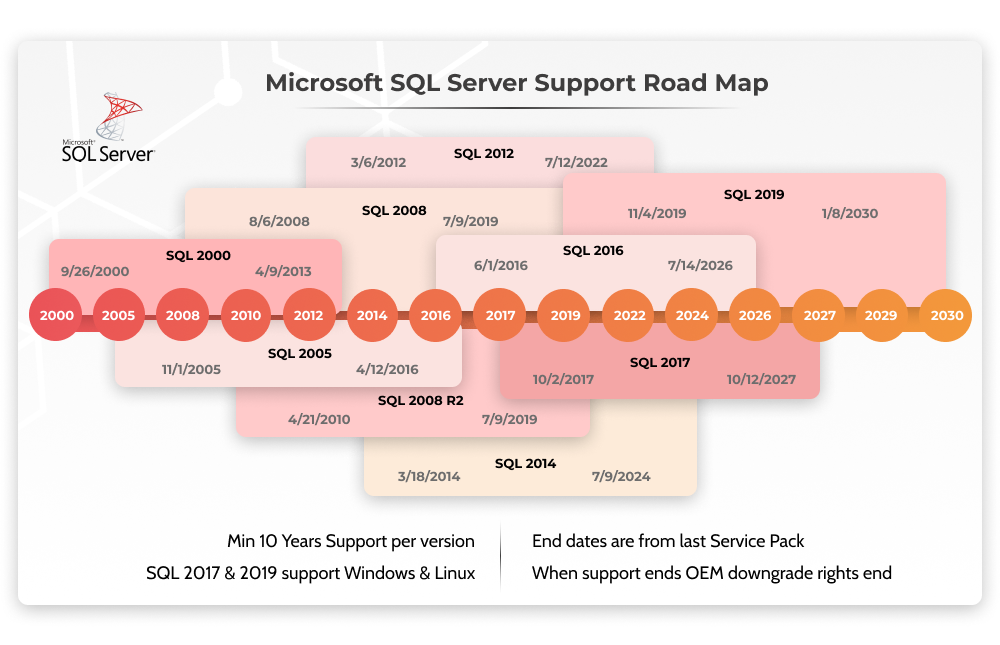
Microsoft’s extended support for SQL Server 2016 is slated to end in July 2026. While you technically have a few years left, the window to plan, test, and execute a migration is narrower than it appears.
- Now–Q4 2024: Complete inventory, risk assessment, and decide on a target platform.
- 2025: Run pilot migrations on non‑critical workloads. Fine‑tune performance and resolve compatibility issues.
- Early 2026: Begin full‑scale migration of production systems. Keep a fallback plan in case of unforeseen hiccups.
- Mid‑2026: Decommission remaining SQL Server 2016 instances after confirming data integrity.
Delaying beyond the first half of 2026 dramatically increases the chance of a rushed migration, which in turn raises the risk of data loss or extended downtime.
Bottom Line
End of support for SQL Server 2016 isn’t just a calendar event; it’s a signal to evaluate security, compliance, and long‑term strategy. By taking stock of your current deployments, tightening security now, and mapping out a realistic upgrade or migration path, you can turn a looming deadline into an opportunity for modernization.